.png)
A Modern Playbook for Facebook Ads for Realtors

If you want your Facebook ads to actually generate leads—not just drain your bank account—you have to get the technical foundation right. This is the unglamorous but absolutely critical part of the process. Skipping it is like building a house on quicksand.
Properly installing the Meta Pixel and setting up the Conversions API is how you prove your ROI and know exactly which ads are turning clicks into clients.
The Technical Essentials for Facebook Ads
Every winning campaign I've ever run or seen started with rock-solid tracking. Without it, you're just throwing money at the wall and hoping something sticks.
The Meta Pixel is your scout on the ground, a little piece of code that lives on your website and reports back on what visitors do—which listings they view, which forms they start filling out. The Conversions API (CAPI) is its partner, a server-to-server connection that captures data even when browser settings or ad blockers try to get in the way. Together, they give you the full picture.
Get the Pixel installed on your site, either through your website builder's integration or with a tag manager. It's usually a quick job.
Map the important actions on your site (like a contact form submission) to standard events that Facebook understands.
Always, always validate your setup with Meta’s Event Manager before you spend a single dollar.
Installing The Meta Pixel
Think of the Pixel as a snippet of code that goes in the header of your website. It’s the engine that powers your audience building, letting you create powerful lookalike audiences from people who have already shown interest in your listings.
Most modern website platforms like WordPress or Squarespace have simple, built-in integrations for the Pixel. If you're more hands-on, you can add the code manually. Either way, use Meta's Pixel Helper Chrome extension to double-check that it’s firing correctly.
A common mistake is forgetting to add your unique Pixel ID number or accidentally installing the code twice, which will completely skew your data. Pro tip: clear your website cache after installation to make sure you're seeing the live version.
Configuring The Conversions API
CAPI is your secret weapon against data loss from iOS updates and ad blockers. It works directly from your server, bypassing the browser entirely. Combining the Pixel with CAPI can boost your data accuracy to over 95%.
Setting it up is a bit more technical and might require help from a developer, but Meta provides solid guides and partner integrations to make it much smoother. The key is to ensure the events you track through CAPI are identical to the ones your Pixel is tracking to avoid double-counting.
Keep an eye on the API's health inside Events Manager. This will help you catch any errors before they become big problems.
Feature | Pixel | Conversions API |
|---|---|---|
Data Source | Browser | Server |
Reliability | 70-80% | 95%+ |
Blocker Resilience | Low | High |
This table really drives home why you need both. One covers what the other might miss.
Defining Your Key Standard Events
Facebook doesn't just track clicks; it tracks meaningful actions called Standard Events. For real estate, the most important ones are Lead, CompleteRegistration, ViewContent, and Contact.
When someone fills out a "Contact Us" form or requests a home valuation, that's a Lead event. If they download your "First-Time Homebuyer's Guide," you can track that as a CompleteRegistration. This is how you directly connect your ad spend to actual business outcomes.
ViewContent: Tracks visits to specific listing pages.
AddToCart: Surprisingly useful for tracking interest in things like open house RSVPs or exclusive content.
Purchase: This can be mapped to a client closing, the ultimate conversion.
By tracking these specific events, you're optimizing your campaigns for real prospects, not just vanity metrics like clicks and likes.
Complying With Housing Ad Rules
This is non-negotiable. When you create your campaign, you must declare it as being in the Housing Special Ad Category. Failing to do this will get your ads rejected and could even lead to your ad account being shut down.
This selection changes your targeting options to comply with Fair Housing laws. You can no longer target by age, gender, or certain detailed demographics. Instead, you'll focus on location (like specific zip codes) and broad interest clusters.
Use geolocation targeting to focus on the neighborhoods you serve.
Layer on interest clusters, like people interested in "first-time buyer grants" or "Zillow."
This approach keeps you compliant while still allowing you to narrow down your audience effectively.
To really nail your ad strategy, it pays to use modern tools. There are some incredible AI tools for real estate agents out there that can help automate marketing and streamline lead generation.
Troubleshooting Common Setup Issues
Even with a perfect plan, things can go wrong. A stray piece of code or a caching issue can stop your tracking in its tracks.
If you're not seeing data come through, don't panic. Start by using Meta’s "Test Events" tool in the Events Manager—it lets you see in real-time if your events are firing correctly as you navigate your site. You can also check your browser's developer console for script errors. If you're still stuck, it's time to call in your web developer.
The goal is to measure, learn, and adjust. Getting this foundation right is what separates the agents who get a consistent flow of leads from Facebook from those who don't.
Structuring Campaigns and Targeting Your Ideal Clients
With the technical grunt work out of the way, it’s time for the fun part: building the engine that will actually drive your leads. Forget casting a wide, generic net. The real money in Facebook ads for realtors is made with hyper-local precision. This is exactly how you stop burning cash on clicks from people two counties over and start attracting motivated buyers and sellers in your own backyard.
One of the most common mistakes I see agents make is lumping all their advertising goals into one massive campaign. A much savvier approach is to build separate campaigns for specific objectives. Think of it like a toolkit—you wouldn't use a sledgehammer for a finishing nail, right?
For example, an ad you run to promote a new listing needs a completely different goal, audience, and message than one designed to capture seller leads with a home valuation guide.
Designing Your Campaign Architecture
Let's walk through a practical campaign structure that just plain works for most agents. By creating separate campaigns for each major business goal, you gain tight control over your budget and can actually see what’s working and what isn't for each objective.
Here’s a simple, powerful way to organize your efforts:
Listing Promotion Campaigns: The main goal here is straightforward: get eyes on a specific property and drive inquiries. Your audience will typically be broad, targeting people interested in real estate within a tight radius of that listing.
Seller Lead Campaigns: These are laser-focused on homeowners. The ad offers something valuable—a "What's My Home Worth?" guide or a local market report—in exchange for their contact info.
Buyer Lead Campaigns: This is where you target renters or anyone showing signs of wanting to buy. You could offer a "First-Time Homebuyer Checklist" or promote an educational webinar.
This segmented approach ensures your ad creative and message are perfectly tuned to the person seeing it. A potential seller in a specific zip code needs to hear something very different than a first-time buyer looking across the entire city.
Key Takeaway: Don't run a single, catch-all campaign. Build distinct campaigns for listings, buyers, and sellers to maximize relevance and conversion rates.
Mastering Hyper-Local Targeting
Facebook’s Special Ad Category for housing does restrict some demographic targeting to comply with fair housing laws. But here's the thing: it leaves the most powerful tool for realtors completely untouched. Location. This is your secret weapon.
You can still zero in on specific zip codes, cities, or even draw a radius as small as one mile around a new listing or an entire subdivision. For a classic "Just Listed" ad, a 15-mile radius around the property is a great starting point. For a seller-focused campaign, you might target the three or four specific zip codes that make up your primary farm area.
This flow chart breaks down the foundational steps you need to have in place before you can even think about targeting.
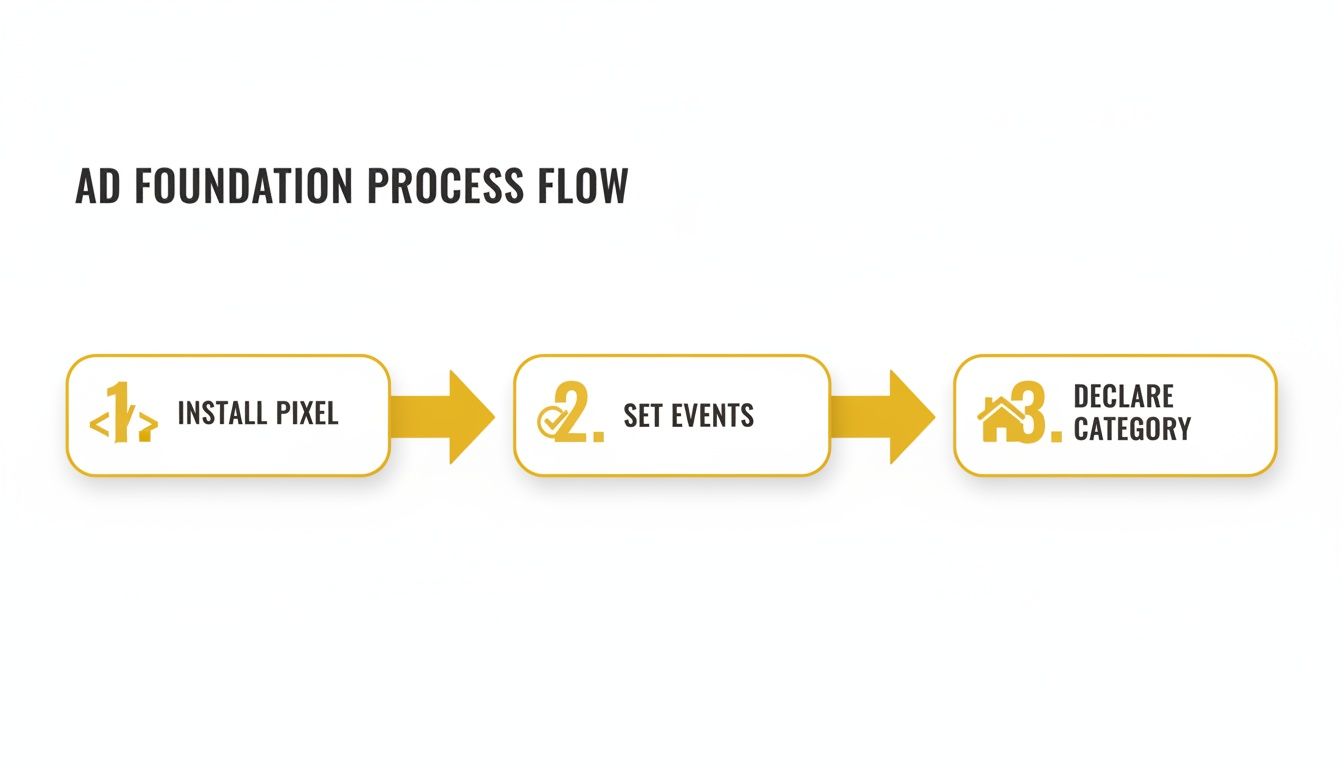
As you can see, getting your pixel installed, defining your conversion events, and declaring your ad category aren’t just suggestions—they’re the non-negotiable prerequisites to effective targeting.
Layering Audiences for Maximum Impact
Once you’ve got your location dialed in, it's time to build out your audiences. This isn't a one-and-done task; it's a multi-layered process that takes people from "cold" prospects to warm, ready-to-talk leads. Your strategy should always include a mix of saved, custom, and lookalike audiences.
Saved Audiences (Cold Traffic)
This is your starting point for reaching brand new people. Inside the Special Ad Category, you can layer broad interests on top of your location targeting. For instance, you could target people within your chosen zip codes who have also shown an interest in platforms like Zillow or Trulia.
Custom Audiences (Warm Traffic)
This is where your ads become incredibly powerful. Custom Audiences are built from your own data. You can create audiences of people who have:
Visited your website in the last 90 days.
Engaged with your Facebook or Instagram page.
Watched a portion of your video ads.
Subscribed to your email list (by uploading a customer file).
These are people who already know who you are, making them far more likely to take the next step. Running a retargeting ad to a custom audience of recent website visitors is one of the highest-ROI plays you can make. It’s no wonder 92% of U.S. realtors now use Facebook to connect with a potential pool of 253 million users in the U.S. alone. You can discover more insights about why real estate marketing is dominated by social media.
Lookalike Audiences (Scaling Up)
Once you have a solid Custom Audience—like a list of past clients or a hundred website leads—you can ask Facebook to work its magic and build a Lookalike Audience. The algorithm analyzes the common traits of the people on your list and then finds millions of new users who "look" just like them.
This is the ultimate way to scale your ads. You're essentially cloning your best clients and leads to create a highly relevant cold audience that almost always outperforms one based on generic interests.
Designing Ad Creative That Stops the Scroll
Think about it: your ad is an uninvited guest crashing someone's social feed. To earn even a second of their time, you have to break their mindless scrolling pattern with something that hits them right where they live—connecting with their hopes, problems, or dreams.
For real estate agents, this means your ad creative can't just be a pretty picture. It needs to tell a story, offer a solution, or provide an irresistible peek into a life they want. Generic stock photos and boring MLS descriptions just won't cut it. Success with Facebook ads for realtors is all about creative that feels real, local, and genuinely valuable.
Writing Ad Copy That Connects
That first line of your ad is your digital handshake. Make it count. It needs to grab them immediately and speak directly to what they want. A formula I've seen work time and again is simple: lead with a strong hook, give them the key details, and finish with a crystal-clear call to action (CTA) that feels easy to complete.
Let's look at a few angles for different real estate scenarios:
For a New Listing: Forget "Just Listed: 3 Bed, 2 Bath." That’s what Zillow is for. Instead, sell the feeling. Try something like, "Imagine waking up to coffee on this private, sun-drenched patio every morning. ☀️" You’re painting a picture and selling a lifestyle, not just listing features.
For an Open House: Build some urgency and a little FOMO. "Your search for the perfect [Neighborhood Name] home ends this Saturday! Join us for a first look at 123 Main St and see why your neighbors never want to leave."
For a Seller's Guide: Play to their curiosity. We all want to know what the house down the street sold for. A great hook is: "Was that your neighbor's house that just sold? Get the latest [Your City] home prices and find out your property's new value in our free 2024 Market Report."
Pro Tip: Write like you're talking to a friend. Use "you" and "your" to make it feel personal. Keep sentences short, toss in a few emojis for personality, and use line breaks to make your copy easy to scan on a phone.
There are countless ways to frame your ad. The right angle depends entirely on who you're trying to reach and what you want them to do. Here’s a quick breakdown of some effective creative angles I’ve used.
Real Estate Ad Creative Angles
Ad Angle | Primary Goal | Target Audience | Key Message |
|---|---|---|---|
Just Listed | Generate immediate interest in a new property. | Active local buyers, retargeting list. | "Be the first to see it!" Showcase the #1 feature. Create urgency. |
Open House | Drive foot traffic to a specific event. | Geofenced local residents, lookalike audiences. | "Tour your dream home this weekend!" Community-focused, low-pressure invitation. |
Home Valuation | Capture seller leads. | Homeowners in specific zip codes. | "Curious about your home's new value?" Tap into market trends and curiosity. |
Buyer's Guide | Nurture first-time homebuyers or relocators. | Renters, people interested in real estate. | "Stop renting! Here's how to buy a home in [City]." Offer free, valuable advice. |
Agent Branding | Build name recognition and trust. | Broad local audience. | "I'm [Your Name], your local real estate expert." Share market insights or a quick tip. |
Choosing the right angle is half the battle. The other half is bringing it to life with compelling visuals and copy that resonate with that specific audience.
The Power of Video in Real Estate Ads
If you aren't using video, you are leaving money on the table. It’s that simple. Video ads consistently pull in higher engagement and build that know-like-and-trust factor way faster than a static image ever could.
And the best part? You don't need a Hollywood budget. Your smartphone is more than enough. In fact, a raw, authentic video often feels more genuine and connects better than some overly polished corporate ad.
Here are three dead-simple video ideas you can shoot today:
The 60-Second Property Tour: Start outside talking about the curb appeal. Walk in and point out the 3-4 best features—the stunning kitchen, the primary suite, the backyard oasis. End with a simple CTA like, "Tap 'Learn More' to see all the photos and the price."
The Agent Intro: Just be you. Face the camera and introduce yourself. Say who you help (e.g., "I specialize in helping first-time buyers in the [Neighborhood] area") and offer one great piece of advice. Keep it under 30 seconds.
The Client Testimonial: This is pure gold. Ask a happy client to shoot a quick vertical video answering one question: "What was the best part of working with me?" This kind of social proof is priceless.
Visuals That Capture Attention
Outside of video, your images and graphics still have a huge role to play. Professional photos for your listings are an absolute must—that's non-negotiable. For your other ads, you can create eye-catching visuals with some simple, and often free, tools.
Carousel Ads: These are fantastic for showing off multiple photos of a listing or breaking down the benefits of your homebuyer's guide. Each card in the carousel gets its own headline and link, giving you more chances to hook them.
Single Image Ads: Use your absolute best photo—the "hero shot." This might be a gorgeous twilight shot of the exterior or that magazine-worthy kitchen. One incredible image is better than five mediocre ones.
Canva Graphics: A tool like Canva is perfect for creating simple, branded graphics for lead magnets. Put a bold headline over an image, like "Get Your Free [City] Home Valuation," to make your offer impossible to miss.
Just remember to keep your visuals and copy aligned. If your ad text raves about the "stunning backyard," make sure that's the first thing people see. This simple consistency builds trust and makes your entire ad work that much harder.
Mastering Lead Capture and Instant Follow-Up

Getting someone to click your ad is just the opening move. The real win is turning that click into an actual conversation, and that critical handoff happens at the point of lead capture. How you collect their info can literally make or break your entire campaign's ROI.
For realtors running Facebook ads, this usually boils down to two paths: using Facebook's built-in Instant Forms (what they call Lead Forms) or sending traffic to a custom landing page on your website. Each has its place, and knowing when to use which is a game-changer.
Instant Forms: The Frictionless Path to a Lead
Instant Forms are Meta’s native lead capture tool. When someone clicks your ad, a form pops up right there inside the Facebook or Instagram app. The magic is that it's already pre-filled with the contact info from their profile. They just have to confirm and hit "submit."
This process removes nearly all the friction, which is incredible for maximizing the sheer volume of leads you generate. If you're running high-volume campaigns—like blasting out a new listing or offering a free homebuyer guide—the simplicity of an Instant Form almost always gets you a much lower Cost Per Lead (CPL).
But there's a catch. Because it’s so easy to submit, you'll sometimes find the lead quality can be a mixed bag. Some people click and submit in a few seconds without really absorbing what they signed up for, leading to more "tire-kickers."
Landing Pages: The High-Intent Qualifier
A dedicated landing page, on the other hand, forces a user to leave the comfort of the social media app and visit your website. That extra step immediately introduces a bit of friction, which is actually a good thing—it naturally weeds out the people who aren't serious. Anyone willing to wait for a page to load and manually type in their info is signaling they're genuinely interested.
This is your turf. You control the entire experience. A landing page gives you the space to:
Showcase way more photos, videos, and juicy details about a listing.
Feature a personal video message from you.
Build trust with client testimonials and social proof.
Ask more specific qualifying questions on your form.
Sure, your CPL will likely be higher with a landing page, but the leads you get are often far more qualified. This approach is my go-to for seller lead campaigns offering a home valuation or for driving sign-ups to a detailed homebuyer webinar. For those, quality trumps quantity every time.
Key Takeaway: Use Instant Forms for speed and volume when you want to cast a wide net (think listing promos). Switch to landing pages when you need higher-quality, pre-qualified leads for more specific offers (like seller guides).
Automating Follow-Up: Because Speed Is Everything
It doesn't matter how you capture the lead; the moment they hit "submit," the clock starts ticking. Loudly. The agent who responds first dramatically boosts their chances of ever turning that lead into a client. Manually checking Facebook and downloading a CSV of leads is a surefire way to lose money.
This is where automation becomes your most valuable employee. Your lead form, whether it’s an Instant Form or on a landing page, absolutely must be plugged directly into your Customer Relationship Management (CRM) software. Tools like Zapier are perfect for this, creating a seamless bridge that zaps new lead info from Facebook straight into your CRM in real time.
Once the lead hits your CRM, an automated follow-up sequence needs to fire off instantly. This isn’t a nice-to-have; it’s a non-negotiable part of a modern Facebook ads for realtors strategy.
A simple but killer sequence might look like this:
Instant SMS: The second they submit, their phone buzzes. "Hi [First Name], it's [Your Name]. Thanks for your interest in 123 Main St! Are you free for a quick chat about it tomorrow at 10 AM?"
Immediate Email: An email follows right behind, giving them more details on the property or the guide they requested.
Day 2 Follow-Up: Another email goes out with more value, maybe a link to your blog on "5 Things Every Buyer in [Your City] Should Know."
This kind of automated nurturing keeps you top-of-mind and provides value while you free up time to make personal calls. And if you really want to put this on autopilot, you can supercharge your schedule with an AI appointment setter for real estate agents to handle the back-and-forth of booking calls. You'll never let a hot lead go cold again.
Managing Your Budget and Measuring What Truly Matters

Running successful Facebook ads for realtors isn't about setting a budget and crossing your fingers. It’s about making smart, data-driven decisions that turn your ad spend into a predictable pipeline of clients. This means understanding how to put your money to work and, just as importantly, knowing exactly which numbers to watch like a hawk.
A question I get all the time is, "How much should I spend?" While there's no single magic number, a great starting point for a single campaign is around $15-$25 per day. This gives the Meta algorithm enough data to start finding your ideal audience without you having to drain your bank account. You can always scale up once you’ve got a winning ad.
Setting Your Bidding Strategy
Your bidding strategy is basically your instruction manual for Facebook on how to spend your budget to get the results you want. There are a few options, but most realtors will find their sweet spot with one of two primary approaches. Each serves a different purpose, so knowing the difference is key to keeping your costs in check.
Let's break down the two most common choices:
Lowest Cost (Highest Volume): This tells Facebook to get you the most leads possible for your budget. It's aggressive and fantastic for maximizing lead volume, especially for things like listing promotions or open house ads where you want to reach a broad audience fast. The trade-off? Your cost per lead can jump around a bit.
Cost Per Result Goal: With this approach, you tell Facebook the average amount you’re willing to pay for a lead. It’s all about consistency, helping keep your CPL stable. This is perfect for ongoing lead gen campaigns, like a seller valuation funnel, where predictable costs matter more than sheer volume.
For agents just starting out, I almost always recommend beginning with the Lowest Cost strategy. It helps you gather that crucial initial data. Once you have a baseline for what a lead costs, you can switch to a Cost Per Result Goal to lock in your profitability as you start to scale.
The KPIs That Actually Move the Needle
Your Ads Manager is flooded with data, but honestly, only a few metrics truly define the health of your campaigns. Focusing on these key performance indicators (KPIs) keeps you from getting lost in vanity metrics and lets you make sharp, effective decisions.
Here are the three non-negotiables you need to track:
Cost Per Lead (CPL): This is your north star. It’s simply your total ad spend divided by the number of leads you generated. Your CPL tells you exactly how much it costs to get a potential client's contact information.
Click-Through Rate (CTR): This measures how many people who saw your ad actually clicked on it. A high CTR (I like to see it above 1% for real estate) is a great sign that your ad creative and copy are hitting the mark with your audience.
Conversion Rate: This is the percentage of people who clicked your ad and then actually completed the action you wanted (like filling out your form). This metric shows you how effective your landing page or Instant Form really is.
By monitoring these three metrics daily, you can quickly diagnose problems. A low CTR points to weak creative. A low conversion rate tells you the problem is likely with your landing page or your offer.
What Is a Good CPL for Real Estate?
Knowing your numbers is one thing, but how do they stack up against the competition? Luckily, the real estate industry sees incredible performance on Meta's platforms. Here's a game-changer: Facebook ads in real estate have an average conversion rate of 9.53%, which towers over most other industries. This is exactly why savvy agents are pouring their budgets here.
The average cost per lead (CPL) sits at $16.61 in the U.S. real estate sector, making it an affordable powerhouse. For agents closing deals, the cost per acquisition (CPA) averages just $16.92—an incredible value when a single commission can be five figures. You can learn more about real estate ad benchmarks and findings to see how your campaigns compare.
This data gives you a powerful baseline. If your CPL is coming in around $20, you’re in a great spot. If it’s creeping up to $50 or more, that’s a clear signal to re-evaluate your audience, creative, or offer. Use these benchmarks not as rigid rules, but as guideposts to inform your strategy and ensure every dollar you spend is working to fill your pipeline.
Got Questions About Facebook Ads? I've Got Answers.
When I talk to real estate agents about running Facebook ads, the same handful of questions always pop up. It's totally normal. You’re dealing with budgets, lead quality, and a rulebook that can feel a mile long. Let's cut through the noise and tackle the big ones head-on.
One of the first things agents ask is, "Seriously, how much does this cost?" There’s no magic number, but I’ve found the sweet spot for a new campaign is somewhere between $15 and $25 per day. That’s enough to get Meta’s algorithm working for you, learning who to show your ads to, without you having to drain your bank account right out of the gate.
What’s a Realistic Starting Budget?
Think of that initial budget as your testing ground. It’s not about getting a flood of deals on day one; it's about gathering data. You’re figuring out which photos, videos, and headlines actually get clicks from local buyers and sellers.
Once you find an ad that’s consistently pulling in good leads at a price that makes sense, that’s when you start to open up the throttle. It’s like dipping your toe in the water to check the temperature instead of doing a cannonball into the deep end. This approach stops you from blowing hundreds of dollars on a campaign that was never going to work in the first place.
How Do I Stop Getting So Many Junk Leads?
Nothing is more frustrating than a list of leads who ghost you or were never serious to begin with. If you're using Instant Forms and the lead quality is poor, the problem is usually a lack of friction. The forms are so simple to fill out that you’ll always get a few "tire kickers" who were just curious.
Here’s how you can tighten things up:
Add a simple qualifying question. Go into your Instant Form and add a multiple-choice question like, "When are you looking to buy a home?" or "Is your home currently on the market?" This tiny extra step is often enough to make someone who isn't serious just scroll on by.
Send traffic to a landing page. For higher-intent leads, like someone requesting a home valuation, a dedicated landing page almost always works better. The act of leaving Facebook or Instagram to fill out a form on your website naturally filters for people who are much more motivated.
Get specific in your ad copy. Be crystal clear about what they're getting. Don't promise a "list of homes" if you're offering a specific PDF guide. Vague ads create confused leads. Tell them exactly what to expect, and you'll attract the right people from the start.
The real goal isn't just to get the cheapest lead possible. It's to get the most cost-effective appointment. I’ll happily pay a little more for a lead who is actually ready to talk business. That’s a trade you should make every single time.
How Do I Stay Out of Trouble With the Housing Rules?
This one is non-negotiable. Meta's rules around housing ads are strict, and for good reason. The absolute first thing you must do is declare your ad under the Housing Special Ad Category. This is your ticket to staying compliant and avoiding ad rejections or, even worse, getting your account shut down.
Choosing this category automatically takes away targeting options based on age, gender, and other personal attributes to comply with Fair Housing laws.
The trick is to get really good with the tools you are allowed to use. Your best friend here is location-based targeting. You can still zero in on specific zip codes or draw a tight radius around your new listing. This is how you reach a relevant, local audience while playing by the rules. Considering that 77% of REALTORS® use Facebook for their business, mastering this is essential. You can check out more realtor social media stats to see just how critical the platform has become for driving real revenue.
At Wojo Media, we build and manage these exact types of campaigns for agents and brokers every day. We remove the guesswork from paid ads so you can get a predictable flow of qualified appointments. If you’re ready to fill your pipeline, book a free strategy call with our team today.
Comments