.png)
Facebook Lead Ads to Google Sheets: 5 Proven Methods

A buyer submits a Facebook instant form at 2 a.m. Your ad account records the conversion, but the sales team won't see the contact until someone remembers to export a CSV. By morning, the lead is sitting in Meta's Leads Center, the spreadsheet is stale, and nobody knows whether the delay came from the campaign, the connection, or a missed handoff.
That's why Facebook Lead Ads to Google Sheets remains such a practical starting point. A connected sheet gives media buyers and sales reps one shared intake layer, while automation tools can add a new row near real time whenever a form submission arrives, as documented in Zapier's Facebook Lead Ads and Google Sheets integration. The connection is easy. Trusting what happens after the row appears is the harder job.
Why Pipe Facebook Lead Ads Into Google Sheets in the First Place
Google Sheets solves the first operational problem most small and mid-market teams face: visibility. Sales can open the same file as the paid media team, filter by campaign, add follow-up notes, and flag a record without waiting for a developer or CRM administrator. Revision history also gives the team a basic audit trail when someone changes a status, overwrites a value, or rearranges a column.
That makes Sheets useful as a triage layer, not automatically as a permanent system of record. Its job is to catch every submission, preserve the raw response, and make the lead available for the next action. A sales rep might call from the sheet, while another automation sends the same record to email, a CRM, or a reporting view.
Facebook Lead Ads are a strong reason to care about that intake layer. A 2026 industry roundup reports an average conversion rate of 7.72% for Facebook lead campaigns across industries in 2025, based on an analysis of 726 campaigns, compared with 8.67% in 2024. The same roundup states that Facebook Lead Ads generate 2.4 times more leads on average than traffic campaigns that send users to landing pages, because the form stays inside the platform. Those figures appear in SocialPilot's Facebook statistics roundup.
When Sheets is the right first move
Sheets works well when:
Volume is manageable: Your team receives a stream of leads that people can inspect and work without competing edits.
Ownership is shared: Media buyers need to verify delivery, and sales reps need a simple queue.
Infrastructure is limited: Nobody is available to administer a CRM, webhook service, or custom database.
The sheet is temporary: You're using it to stage and validate submissions before another system takes ownership.
The best setup separates raw intake from human workflow. Keep the original lead fields in one protected tab, then use a working tab for status, owner, notes, and next action. That separation prevents a sales rep from accidentally changing the source record while updating a follow-up field.
Practical rule: Treat every row as an event that needs a unique identifier, a source, and a next action. A name and email address alone aren't enough to audit a paid lead pipeline.
The Five Connection Methods at a Glance
The right connection method depends on simplicity, control, routing, and operating cost. Choose for today's workload, then keep the sheet structure portable so you can replace the delivery layer without rebuilding your sales workflow.
Method | Setup Time | Approx. Monthly Cost (50 leads/day) | Typical Latency | Maintenance |
|---|---|---|---|---|
Native Facebook Leads Center export | Low | No recurring automation cost | Manual and delayed | Low, but dependent on human exports |
Zapier | Low | Varies by plan and task usage | Near real time | Low to moderate |
Make | Moderate | Varies by operations and plan | Near real time or scheduled, depending on scenario design | Moderate |
Direct webhook to Google Apps Script | High | No connector subscription, with development and maintenance effort | Near real time | High |
Third-party connectors such as Albato or Pabbly | Low to moderate | Varies by provider and usage | Near real time or scheduled, depending on provider | Moderate |
Native export
Facebook's native export route has the fewest moving parts, but it leaves a visibility gap between submission and review. It suits occasional backup exports, historical cleanup, and teams that do not need immediate follow-up. It performs poorly as a live queue because response time depends on someone remembering to retrieve the data.
Zapier
Zapier is usually the quickest option for a nontechnical operator. The standard flow uses New Lead in Facebook Lead Ads and Create Spreadsheet Row in Google Sheets. You pay for convenience and task usage, while gaining readable field mapping, filters, and routes without maintaining code.
For production use, the connection is only the intake layer. Add a stable lead ID, submission timestamp, form name, and campaign fields, then check for an existing ID before treating a row as new. Otherwise, retries or manual replays can create duplicate follow-up records.
Make
Make supports more granular scenario design, including routers, filters, iterators, scheduled runs, and multiple destinations. That flexibility helps when leads need different validation or routing rules. The trade-off is debugging effort. A scenario can become difficult to trace when several forms, branches, and transformations write to one sheet.
Apps Script and webhooks
A direct webhook gives you the greatest control over payload handling, validation, retries, and deduplication. It also makes your team responsible for authentication, deployment, logs, quotas, and code updates when Meta changes the payload or a form's fields.
Use a staging tab for the untouched payload and a separate working tab for ownership, qualification, attribution checks, and next action. Apps Script is a strong fit when those controls justify the development work, not because a connector fee is undesirable.
Managed third-party connectors
Albato, Pabbly, and similar services sit between custom code and Zapier. They can suit teams that need a visual builder, several destinations, or a different pricing model. Review access permissions, execution logs, retry behavior, and export options before making one service the sole delivery path.
The practical choice is native export for occasional work, Zapier for fast setup, Make for flexible visual routing, Apps Script for technical control, and a managed connector for a middle ground. In every case, treat Sheets as a staging layer. Validate, deduplicate, and route leads there before a CRM or database becomes the system of record.
Setting Up Zapier and Make Without Common Pitfalls
Zapier's basic workflow is straightforward. In the Facebook Lead Ads trigger, select New Lead, authenticate the correct business account, then choose the specific Page and form. In Google Sheets, select Create Spreadsheet Row, choose the Drive file and worksheet, and map each incoming field to a stable column.

Configure the trigger before mapping fields
Use Meta's Lead Ads Testing Tool to generate a sample payload when the form has no usable submission. Don't map from memory. Pull a real sample and inspect the exact keys that arrive, especially custom question identifiers, consent fields, campaign metadata, and submission timestamps.
Several first attempts fail for mundane reasons:
Wrong form selected: The Page is correct, but the automation points to an old or inactive form.
Unreadable field keys: A platform field such as may arrive exactly that way. Rename it in your destination schema rather than assuming the connector will create a friendly label.
Unstable custom questions: Use durable internal column names for custom questions, and keep a field dictionary that records which form question maps to each column.
Timestamp confusion: Store the original submission timestamp separately from any display-formatted date. A timezone mismatch can make a fresh lead look late or place it on the wrong reporting day.
Turn on the Zap only after the action test creates a correctly mapped row. Then submit a real test lead through the live form, confirm the row, and submit a second test lead to observe whether your current workflow duplicates records. For broader guidance on avoiding outbound automation mistakes, focus on permission checks, test records, and failure alerts before launch.
Make follows the same principle, but gives you more control over the sequence. Add the Facebook Lead Ads watch module for a new lead, connect a Google Sheets append-row module, and use a router only when different forms or answers need different destinations. If you batch processing on a schedule, make sure the scenario appends rather than updates the same row. An iterator or stable record key should determine each write, not the position of the item in the bundle.
Test the complete chain with real submissions, not only a connector preview.
Pause the workflow during a major campaign launch if you expect a sudden burst and haven't verified quotas, task limits, or retry behavior. A controlled pause is safer than allowing a misconfigured scenario to write malformed rows repeatedly.
Building a Webhook Pipeline With Leads Access and Apps Script
A webhook pipeline is appropriate when the sheet needs a controlled ingestion layer rather than a simple connector. The flow starts in Meta's Leads Access configuration. Request the required access, select the Page and form, subscribe the relevant webhook events, and send a test event before directing production traffic to the endpoint.

Capture and preserve the raw event
The webhook payload should be stored before you normalize it. The event commonly includes an object identifier, a field identifying the event type, and a lead payload containing a . Treat that identifier as the canonical deduplication key. Keep the raw body in a protected log tab or another durable store so you can replay and investigate a failed transformation.
Your Apps Script web app needs a handler that:
Reads the request body.
Parses the JSON safely.
Ignores unsubscribe or test events unless your monitoring process needs to record them.
Extracts and validates .
Retrieves or parses the lead fields according to your approved access flow.
Normalizes field names into a fixed schema.
Checks whether the identifier already exists.
Appends the row with an ingestion timestamp and available source parameters.
Returns a successful response only after the write completes.
The webhook-driven Facebook Lead Ads and Google Sheets guidance highlights the operational advantage of near-real-time delivery, but the important design point is reliability. A webhook isn't safer merely because it's faster. Without validation, retry handling, and run monitoring, a fast failure can create a larger blind spot.
Deploy for controlled delivery
Deploy the script as a web app, execute it as the owner, and grant access according to the endpoint requirements. Copy the deployed URL into the Leads Access configuration, then test the endpoint with a real form event. Check the raw event log, normalized row, timestamp, and source fields independently.
Webhook deliveries can retry after a failed response. If your script writes the row and then returns an error, Meta may send the same event again. That's why the write must be idempotent. Check before appending, and use a lock around the read-and-write operation so two simultaneous deliveries can't both pass the duplicate check.
Apps Script is attractive because the connector subscription isn't the limiting factor. The cost appears as engineering time, monitoring, access management, and maintenance. If nobody owns those responsibilities, a managed connector may be more dependable than code that only the original builder understands.
Keeping the Pipeline Clean and Trustworthy
Most lead pipelines look healthy during the first launch. The failures appear later, after someone edits a form, changes a column, reconnects an account, or submits the same form twice. A row count alone won't tell you whether the pipeline is complete or trustworthy.
The first control is a stable identity key. Use when it's available, and keep it in a protected column. Email can support a secondary duplicate review, but it shouldn't replace the lead identifier because the same person may submit more than once, use different contact details, or share an address with another contact.
The failures that matter
Failure Mode | Signal | Fix |
|---|---|---|
Duplicate delivery | The same lead identifier appears in multiple rows | Check before append and make webhook writes idempotent |
Schema drift | New answers arrive in the wrong column or as blank values | Maintain a field dictionary, protect headers, and test after every form edit |
Missing consent | Consent cells are blank or contain inconsistent values | Keep consent as a dedicated field and review null values on a recurring schedule |
Attribution loss | Campaign or source fields don't match the original submission | Preserve raw metadata and use an ad identifier to investigate missing parameters |
Silent interruption | New submissions stop arriving while ads continue running | Monitor the last received event and connector run history |
Form edits create schema drift because the destination sheet usually expects the old structure. Don't let a new custom question go unmentioned and become an unnamed column. Add the destination column deliberately, document the form version, and run a real submission through the full path.
Consent deserves a separate review because a populated contact record isn't automatically a usable marketing record. Add validation that highlights blank consent cells, and send a recurring summary to the person responsible for compliance. Don't infer permission from campaign membership or a completed form.
Protect attribution before it disappears
UTM parameters can be lost during redirects or may not arrive in the format your sheet expects. Preserve the raw ad, campaign, form, and lead identifiers at ingestion. If source parameters are missing, use a helper column to flag the record for reconstruction from the available , rather than filling the attribution with a guess.
Audit the pipeline, not just the campaign. A low cost per lead doesn't prove that the right source, consent state, and sales owner survived the handoff.
Keep one immutable intake tab and a separate working view. Use protected ranges for identifiers and raw fields, dropdown validation for lifecycle statuses, and conditional formatting for missing owners, missing consent, or unprocessed records. Those controls are simple, but they prevent a shared spreadsheet from becoming an unreviewable collection of manual edits.
When to Graduate Beyond Google Sheets
Sheets stops being a useful system of record when the organization needs guarantees that a shared grid isn't designed to provide. The decision isn't only about lead volume. It's about contention, routing complexity, response expectations, and the cost of losing context.
Use the operational signals
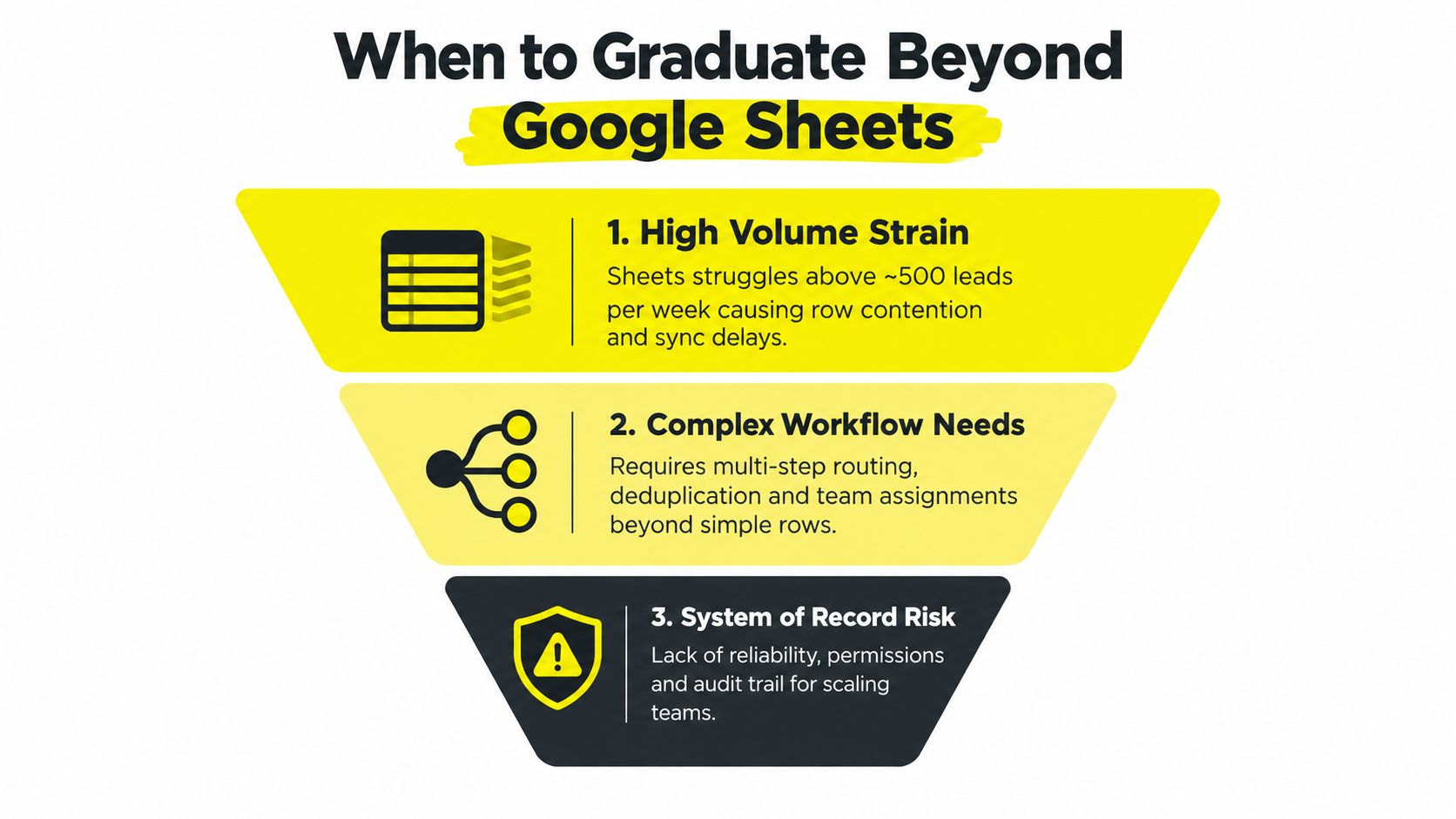
A practical upgrade framework has three signals:
High-volume strain: If the team is working above roughly 500 leads per week, row contention and sync delays can make ownership unclear. This threshold is an operating guideline, not a universal limit.
Complex workflow needs: If one lead must be routed by geography, campaign, answer, sales owner, and funnel stage, a flat append action becomes difficult to govern.
System-of-record risk: If permissions, auditability, deduplication, and recovery matter more than keeping the setup free, Sheets is carrying responsibilities it wasn't built to own.
Each signal points to a different next step. A lightweight staging tool such as Airtable can preserve flexible views while improving structured records. A marketing automation platform can handle lead nurture and native CRM synchronization. A full CRM such as HubSpot or Salesforce is more appropriate when sales activity, ownership, lifecycle stages, and reporting must live together.
The handoff doesn't need to be abrupt. Keep Facebook Lead Ads flowing into a staging layer, validate the record, and pass it into the CRM. Protect the raw submission so the marketing team can reconcile ad delivery with sales outcomes without asking the CRM to reconstruct the original event.
Keep Sheets temporary by design
Google Sheets is a reasonable 24 to 72 hour buffer for teams that need a shared queue and basic QA. It becomes risky when the first sales action lands there and nobody records the outcome elsewhere. Once a rep calls, qualifies, or disqualifies the lead, the authoritative status should move into the system that manages the customer relationship.
The most reliable architecture treats Sheets as an inspection point. It catches missing fields, exposes duplicates, and gives the team a human-readable fallback. It doesn't have to remain the final destination.
Wojo Media helps businesses design and manage paid lead pipelines across Facebook, Instagram, TikTok, Google, and YouTube, including the tracking and backend measurement needed to turn form submissions into qualified opportunities. Visit Wojo Media to discuss a campaign and lead-routing system that fits your sales process, rather than forcing your team to manage growth from an unreliable spreadsheet.
Comments