.png)
YouTube Conversion Tracking How to Set It Up Right

You launch a YouTube campaign, watch the click-through rate, and see very few immediate purchases. Search appears to be closing the deals, branded traffic is rising, and direct traffic is taking credit for sales that started with a video impression. If you judge YouTube by clicks alone, you'll likely cut the campaign before its influence becomes visible.
YouTube conversion tracking needs a different operating model. Google Ads can count a conversion when someone sees a video ad and later completes a defined valuable action, such as a purchase or phone call, and conversion tracking is available as a free Google Ads tool. Google's conversion tracking documentation also describes measurement across website actions, store visits, calls, app activity, channel subscriptions, and follow-on views. The practical question isn't whether a tag fires. It's whether your measurement system captures the way YouTube creates demand, including the actions that happen after the viewer leaves the video.
Why YouTube Conversions Look Different Than Search
A search user often arrives with intent already formed. They type a product, service, or brand query, click an ad, and may convert during the same session. YouTube frequently works earlier in the decision process. Someone watches a product demonstration, remembers the brand, searches for it later, and purchases without ever clicking the original video ad.
That journey creates a reporting problem. Search may receive the last click, while YouTube created the initial preference. In a lead-generation account, the same pattern can look like a visitor watching a testimonial, returning through branded search, and submitting a form several days later. A click-only report calls Search the winner. A broader attribution view asks whether the sale would have happened without the video exposure.
Google defines a Video campaign conversion around a valuable action after an ad interaction. That action can be a purchase, phone call, website event, store visit, or in-app activity, depending on the conversion actions configured in Google Ads. The platform has also expanded YouTube-related measurement to include channel subscriptions and follow-on views, which matters for creators, education businesses, and brands that monetize attention over a longer period. Google's overview of measuring advertising results describes this wider connection between ad exposure and later business outcomes.
The click is only one possible path
The mistake I see most often is importing a Search mindset into a video campaign. Buyers set up a purchase conversion, filter the report to clicks, and conclude that YouTube isn't contributing when users don't behave like searchers.
That doesn't mean every view deserves credit. It means the account needs to distinguish between a direct response and an influence signal. A viewer who watches part of a skippable ad and later purchases should be evaluated differently from someone who clicked a call-to-action and completed checkout immediately. Both can matter, but they answer different business questions.
Practical rule: Don't ask YouTube to look like Search. Ask whether the campaign is producing qualified actions across the journey, then validate those actions against backend revenue and lead quality.
Creative and audience choices still matter. If you're working with creators or sponsored content, a resource such as influencer marketing on YouTube tips can help shape integrations that generate attention before a buyer is ready to click. The tracking setup must then preserve that attention as measurable behavior, rather than forcing every result into a last-click box.
Success needs more than one endpoint
For e-commerce, the primary action may be a purchase. For a local service, it could be a qualified call or booked appointment. For a channel-led business, a subscription or follow-on view may show that the campaign is building an owned audience.
Start by defining the action that represents business value. Then add supporting actions for diagnosis, such as form starts, qualified calls, or meaningful content engagement. Keep the primary conversion set focused so automated bidding doesn't optimize toward every low-value interaction your site records.
How YouTube Attribution Actually Works
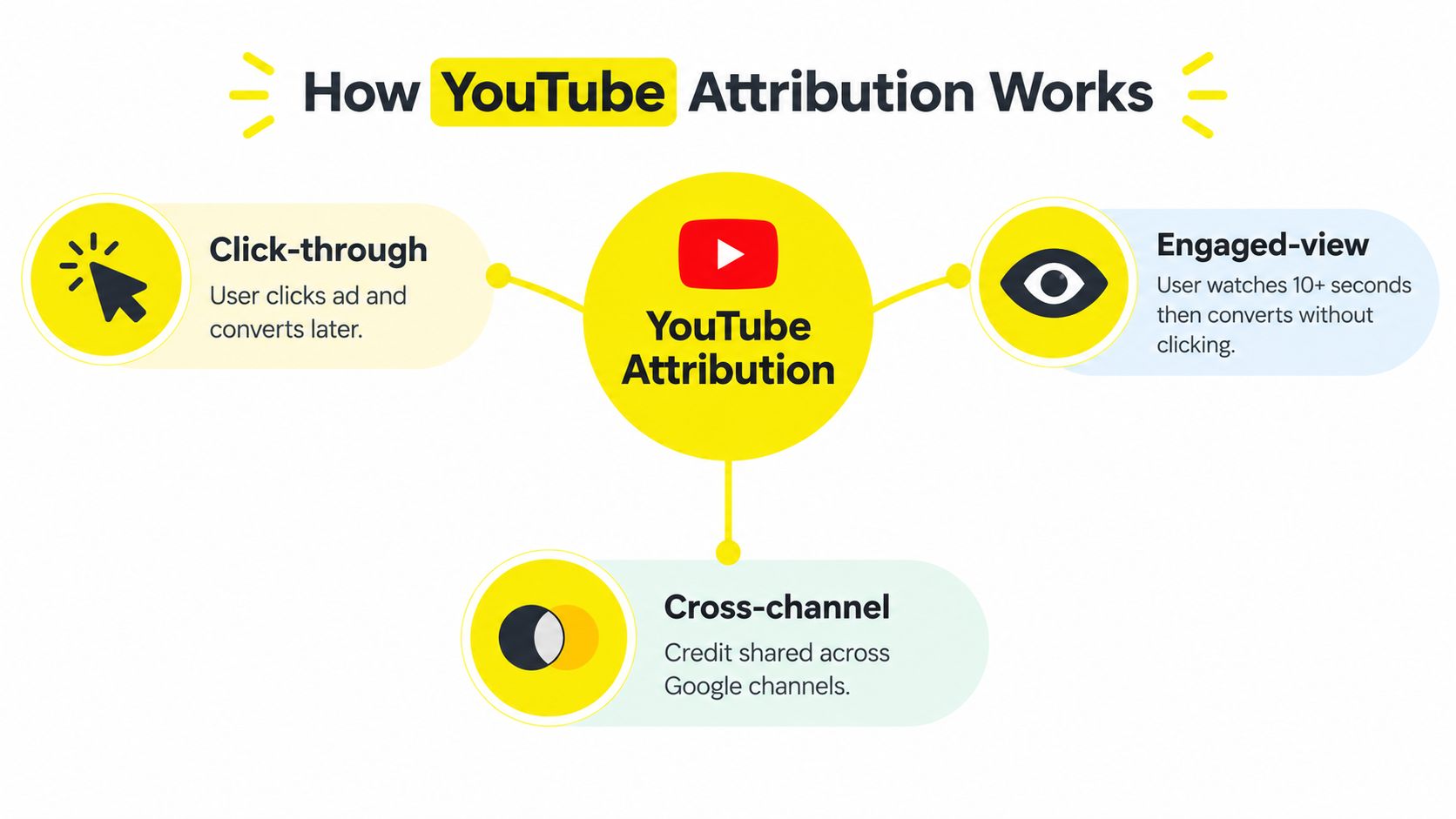
Before installing anything, decide what kind of credit you're trying to measure. Google's YouTube reporting can separate click-through, engaged-view, and view-through outcomes. Those labels aren't interchangeable, and combining them without context can make a campaign look more efficient or less efficient than it really is.
Click-through credit
A click-through conversion follows an interaction with an ad element. The viewer clicks and later completes the configured conversion action within the applicable attribution window. This is the cleanest direct-response signal because the ad interaction is explicit and the path is easier to inspect in Google Ads and analytics.
Use it heavily when the campaign has a clear offer, a short buying cycle, and a landing page designed for immediate action. It's also useful for diagnosing creative. If viewers click but don't complete the action, the problem may sit in the landing page, form, checkout, offer, or tracking rather than in the media buy.
Engaged-view credit
Google documents an engaged-view path for skippable video ads. A viewer can watch 10 or more seconds of a skippable ad and then convert within the configured window without clicking the ad, as described in Google's guidance on conversion measurement for video ads.
That signal is especially relevant when the creative communicates value before asking for action. A prospect may watch the explanation, leave, and return through a later branded search or direct visit. Engaged-view reporting captures a meaningful viewing interaction that click-through reporting misses.
View-through credit
View-through credit captures conversions after an ad impression without requiring a click. It can help explain upper-funnel influence, but it demands discipline. A view-through conversion doesn't prove that the ad alone caused the outcome, especially when the user already knew the brand or encountered other channels during the same journey.
Separate these outcomes in reporting. Review the conversion action, attribution window, campaign objective, geography, audience, and sales cycle together. For longer journeys, compare data-driven attribution and assisted conversion paths instead of treating last-click credit as the only source of truth.
Attribution warning: View-driven credit is useful for measuring influence, not for giving every impression full revenue ownership.
A short sales cycle can support tighter windows and stronger emphasis on click-through conversions. A longer cycle may require engaged-view and view-through analysis, assisted conversions, and branded demand checks. The right answer depends on how buyers move, not on which metric makes the dashboard look strongest.
Setting Up YouTube Conversion Tracking the Right Way
A reliable YouTube setup starts with the business outcome, not the tag. Define what Google Ads should optimize for, what analytics should report, and which events are diagnostic only. If those roles are unclear, technically correct tracking can still drive poor bidding decisions, especially when viewers convert without clicking.
Start with the business action
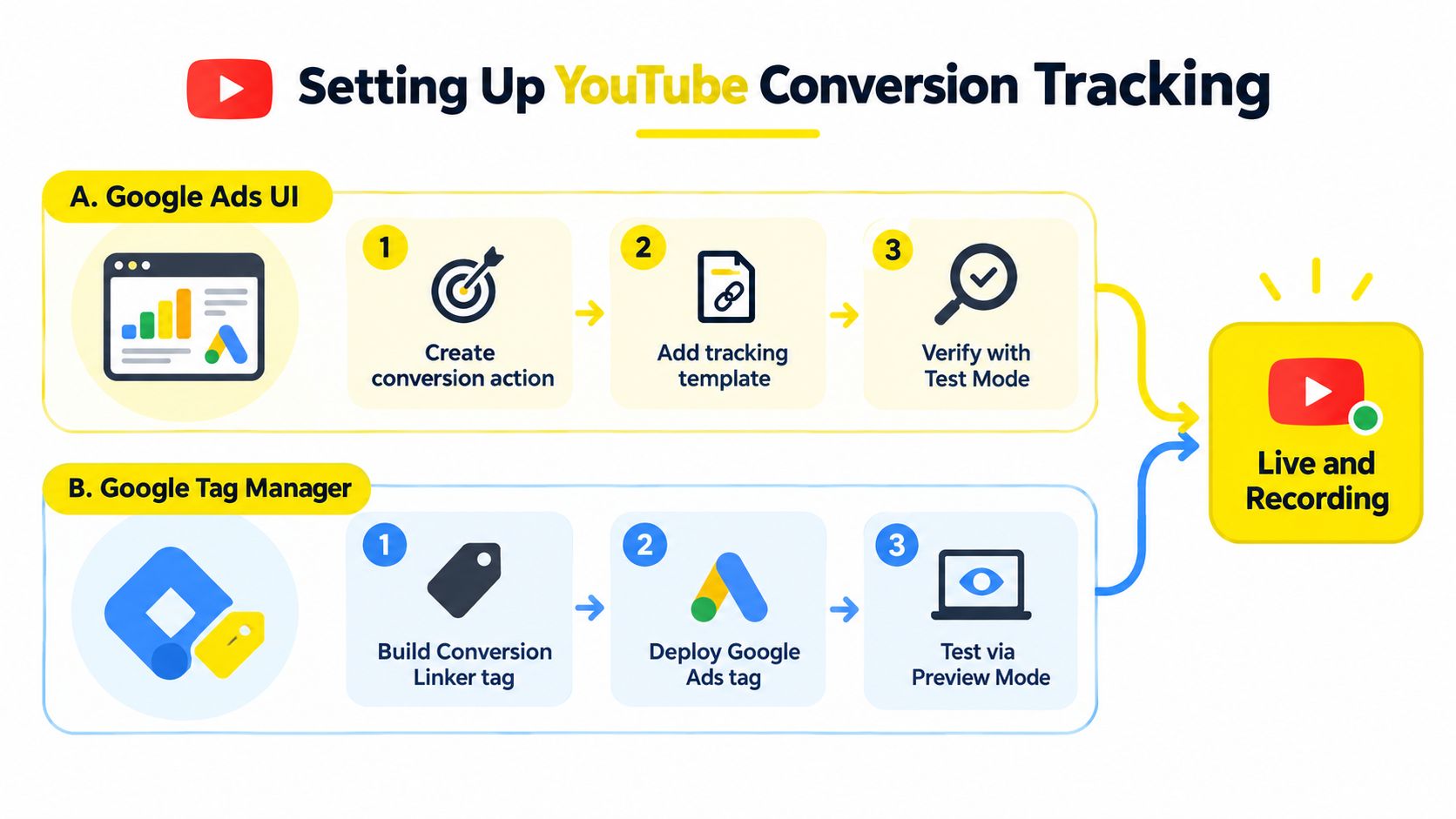
Create the conversion action in Google Ads with a name that identifies both the outcome and its source. , , , and are easier to audit than labels such as .
Choose the counting method that matches how value is created:
Use every conversion when each completed action has independent value, such as separate purchases or multiple qualified calls.
Use one conversion when the account measures one lead opportunity per ad interaction and repeat submissions would inflate results.
Set primary actions carefully so bidding concentrates on the outcome that matters most. Keep secondary actions available for analysis.
Align the attribution window with the time buyers realistically need to convert. A short window can miss delayed demand, while an overly broad window can assign YouTube credit for activity caused by other channels.
Google Ads supports website conversions, mobile calls, store visits, and in-app actions. One campaign can therefore use several valid conversion types. Keep Google Ads help documentation available as the interface and action definitions change.
Choose the implementation path
Install the Google tag directly or import GA4 key events into Google Ads. Direct Google Ads tracking gives the advertising conversion action tighter control. GA4 imports work well when the event taxonomy is already clean and the same key event must be analyzed across the site.
Duplicate counting is the common failure. Do not fire a direct Google Ads purchase tag and import that same purchase from GA4 as separate primary conversions unless the account has a deliberate measurement reason. Give each order or lead a clear measurement owner for optimization.
Verify the event itself
Fire the conversion only after the valuable action is complete. For a lead form, use a confirmed success event or thank-you state rather than the button click. For e-commerce, send the actual transaction event and value from the checkout system. For calls, define the eligible call according to the account's business rules.
Link GA4 before importing key events. Turn on auto-tagging so Google Ads can pass the identifiers used for attribution, then test the full path in Tag Manager Preview, GA4 DebugView, and Google Ads diagnostics. A tag firing in Preview confirms that the browser saw the event. It does not confirm that Google Ads received, processed, deduplicated, and credited it correctly. That final check matters for view-driven journeys, where buyers may engage with YouTube and convert later without a click.
Strengthening Measurement With GTM and Server Side Options
Basic browser tags are a starting point, not a guarantee of complete signal. Consent choices, browser restrictions, ad blockers, cross-device behavior, and page transitions can interrupt the path between an ad interaction and a conversion. The result is often silent underreporting rather than an obvious error.
Use GTM for control
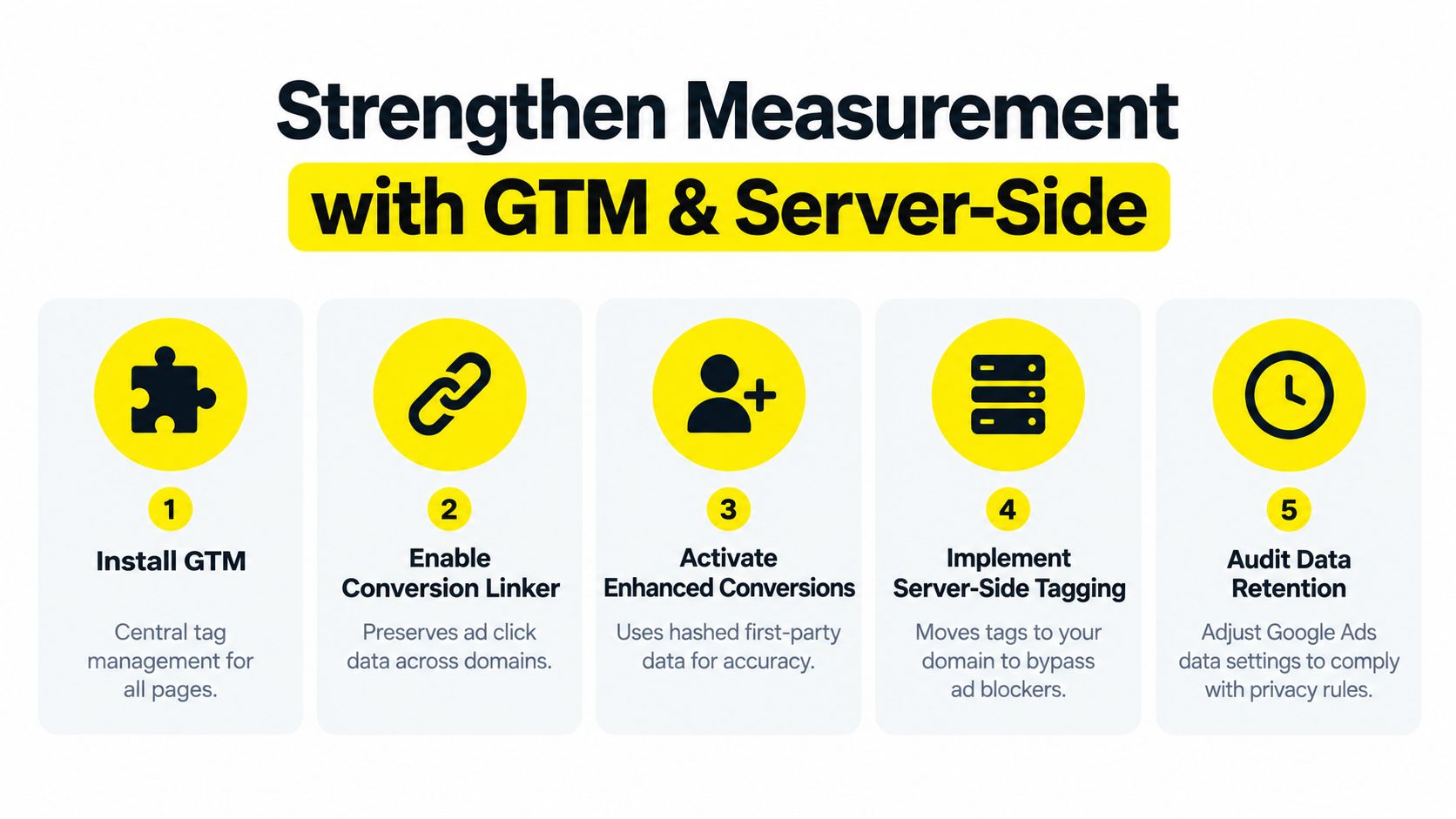
Google Tag Manager gives a team one place to manage the Google tag, GA4 events, Conversion Linker, consent conditions, and testing workflows. It's useful when several platforms share the same events or when developers need a controlled publishing process.
A direct Google tag may be sufficient for a small site with a simple purchase or lead event. GTM becomes more valuable as the measurement plan grows. Keep triggers specific, use consistent event names, and document which tag owns each conversion so a future implementation doesn't create a duplicate.
The Conversion Linker helps preserve ad click information across the site journey. It's particularly important when users move between domains or when the landing page and conversion environment don't behave like one uninterrupted page.
Add privacy-aware recovery
Enhanced conversions can use consented first-party customer information in a protected, hashed form to improve matching. This isn't permission to collect data indiscriminately. The business still needs a lawful consent process, clear data governance, and a configuration that respects the user's choices.
Consent Mode v2 helps Google's systems account for consent signals and modeled outcomes where direct observation is limited. The practical benefit is better visibility into gaps caused by consent decisions, but modeled conversions are estimates, not observed transactions. Keep them identified in analysis rather than blending them into a single unquestioned number.
Know when server-side is justified
Server-side tagging moves parts of the collection and routing process away from the browser. It can reduce dependence on client-side execution and give technical teams more control over which data reaches each destination. That makes it a sensible consideration for high-volume commerce, complex lead funnels, and businesses with several tracking destinations.
It also adds cost, maintenance, consent responsibilities, and debugging complexity. Don't deploy server-side infrastructure to hide an undefined conversion event. First make the browser implementation accurate, then identify where signal disappears.
To diagnose underreporting, compare consented and non-consented traffic, browser and device patterns, landing-page sessions, CRM leads, orders, and Google Ads conversions. A sharp mismatch doesn't automatically identify the cause, but it tells you where to investigate. Review auto-tagging, Conversion Linker coverage, consent behavior, cross-domain transitions, and attribution windows before changing bids.
Reading Cross Platform Results Without Double Counting
A YouTube campaign can assist a conversion that Google Search reports as a click-through win. GA4 may show the session under a later source, while Google Ads reports a YouTube conversion based on its configured attribution logic. These reports aren't necessarily contradictory. They're answering different questions with different data models.
The first job is to create a conversion ledger. List each business outcome once, identify its system of record, and label supporting events separately. For example, the CRM may own qualified lead and closed customer status, Google Ads may own media optimization, and GA4 may own behavioral analysis. Don't add every platform's conversion totals together and call the result revenue.
Google also documents YouTube-enabled Floodlight activities in Display & Video 360. Those activities can count conversions for YouTube and partners line items, allowing enterprise advertisers to use a consistent measurement framework within programmatic video buying. The benefit is connected reporting. The risk is importing the same Floodlight activity into another platform without an agreed deduplication rule.
Use view-driven outcomes in efficiency calculations
For upper-funnel campaigns, excluding view-through conversions from CPA analysis can understate YouTube's contribution. Google's video measurement guidance recommends including view-through conversions when assessing total efficiency, especially where people don't click immediately but convert after exposure.
That doesn't mean you should replace click-through CPA with a blended number and stop investigating. Report the components separately, then calculate the combined efficiency view as a second lens. Compare the result with backend sales quality, cancellation behavior, lead qualification, and revenue timing.
Campaign Goal | Best Credit to Prioritize | When to Include in CPA |
|---|---|---|
Immediate purchase or direct lead | Click-through | Include engaged-view and view-through as supporting context, then test total efficiency |
Demand creation for a considered purchase | Engaged-view | Include view-driven credit when the sales cycle and follow-up data support it |
Brand reach and later branded demand | View-through | Include it in a blended CPA view, but keep impression-based influence separate |
Channel growth or audience development | Subscription or follow-on view | Use business-specific value rather than forcing the action into a purchase CPA |
Prevent channel fights
Use data-driven attribution and assisted conversion reporting to understand shared credit. Watch branded search volume, direct traffic quality, returning users, and CRM conversion stages alongside Google Ads reporting. None of these proves causation alone, but together they provide a more credible view than a single last-click column.
If YouTube receives substantial view-driven credit while backend revenue remains weak, the campaign may be over-crediting exposure or attracting low-intent viewers. If Google Ads shows modest direct credit while qualified demand and branded activity rise after launch, YouTube may be creating value that click reports miss. The answer comes from triangulation, not from defending one platform's dashboard.
Validating Fixing and Scaling Your YouTube Tracking
A tracking setup earns trust through testing. Start with a controlled conversion and follow the data through every system. Confirm the ad interaction, landing-page event, consent state, Google tag behavior, GA4 event, Google Ads conversion action, and final reporting status.
Run a practical validation pass
Check the tag path: Use Tag Assistant or GTM Preview to confirm the intended tag fires only after the valuable action.
Check the analytics event: Use GA4 DebugView to verify the event name, parameters, value, and transaction identifier.
Check Google Ads diagnostics: Confirm that the conversion action is recording, included in the correct goal, and using the intended counting method.
Check attribution settings: Review the conversion window and separate click-through, engaged-view, and view-through results.
Check consent behavior: Test accepted and declined consent states so the banner doesn't block required signals unexpectedly.
Check duplication: Compare direct Google Ads tags, GA4 imports, Floodlight activities, CRM records, and purchase IDs.
Common failures are usually straightforward. Auto-tagging may be disabled, Conversion Linker may not cover the relevant pages, a consent banner may prevent tags from running, GA4 and Google Ads may both claim the same event, or the conversion window may not fit the buying cycle.
Scale only after the signal is understood
At larger spend levels, monitor backend metrics rather than optimizing to platform conversions alone. For lead businesses, connect offline outcomes such as qualified opportunities and closed customers back to the original ad identifier where the implementation supports it. For channel-led businesses, review subscriptions and follow-on views alongside revenue-producing actions.
Modeled conversions can help fill consent-limited gaps, but keep observed, modeled, and view-driven credit visible as separate reporting layers. A campaign that looks efficient only after every credit type is blended deserves scrutiny before budget increases.

Audit the setup whenever the reported conversion volume changes without a matching change in sales, consent rates, landing-page behavior, or CRM quality. That habit protects ROAS better than chasing a single attractive attribution number.
Wojo Media helps brands connect YouTube campaigns with Google Tag Manager events, engaged-view measurement, GA4 imports, and backend conversion signals instead of relying on clicks alone. Visit Wojo Media to request a strategy conversation and audit how your current tracking is affecting optimization and profitable scaling.
Comments