.png)
Google Ads for Small Business: A Complete Guide

You've paid for clicks that looked promising in a dashboard and produced no calls you can point to. The report says people visited, maybe filled out a form, but your front desk or sales sheet tells a different story. That gap between platform activity and real revenue is where most small businesses lose money with paid search.
Google Ads for small business works differently from flyers or social feeds when it's set up around intent and honest measurement. You're not hoping someone scrolling becomes interested. You're showing up when a person is already searching for a solution, and you can tie that click to a call, booking, or sale. The hard part isn't launching a campaign. It's knowing whether your data is trustworthy enough to spend more.
Why Small Businesses Turn to Google Ads
A plumber boosts a social post about water heaters. Neighbors see it, a few tap Like, nobody calls. The same week, a homeowner with a flooded kitchen searches for help and calls the first credible result. The first spend bought exposure. The second kind of spend buys a chance to answer active demand.
The practical appeal of search is timing. You enter a moment where the searcher has named the problem, the service, and often the location. For a med spa, that might be a treatment plus a city. For a tax advisor, it might be a specific planning question with a deadline behind it. The wording tells you how close the person is to acting, and the click can be tied to a call, booking, or sale when tracking is defined before money moves.
What Changed With Search Advertising
Google Ads was introduced in October 2000 with 350 advertisers, marking an important shift from broad online advertising toward measurable, keyword-based customer acquisition. The shift let a small firm bid to appear for specific searches and then judge the result by clicks, calls, bookings, and revenue. That model made performance advertising accessible beyond large national brands.
Google's own baseline is often quoted, so read it carefully. The modeled figures behind that baseline, roughly $2 in revenue for every $1 spent and about $8 in profit per advertising dollar, describe assumptions across many advertisers rather than a promise for one account. Your margin, close rate, and follow up decide whether the math holds.
If you can't connect a click to a qualified conversation or a sale, you don't yet have proof the ads work. You have traffic.
Owners who want setup checklists alongside this measurement focus can compare approaches through Adwave ad resources for local marketers. Treat any checklist as a starting point. Judge each setting by whether it reaches ready buyers and records what happened after the click.
How the Google Ads Auction Works
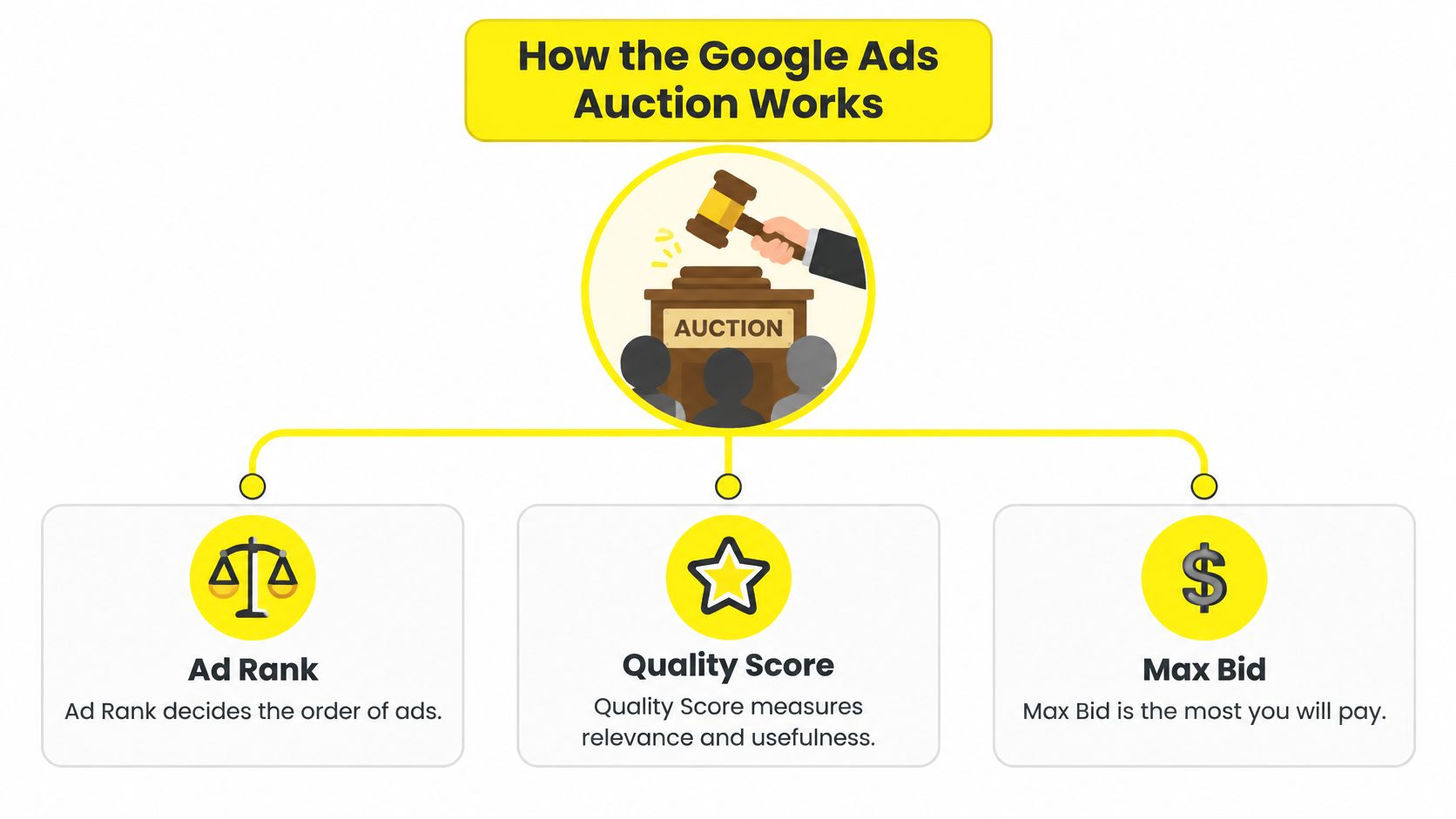
Think of each search as a quick auction held at a market stall. Several sellers raise a hand, but the loudest bidder doesn't automatically get the best spot. Google also asks whether your stall sells what the shopper asked for and whether the shopper will find the counter easy to use.
That analogy explains a confusing truth. A higher bid helps, but it doesn't rescue a vague ad that sends people to a generic page. A smaller business with a tighter match between search, ad, and page can earn a strong position without outspending everyone. Raising bids on a messy account is like shouting louder while pointing customers to the wrong aisle.
The diagram below maps the three pieces owners mix up most often.
What Quality Score Does and Doesn't Do
New advertisers often treat Quality Score as the lever Google pulls in the auction. It's better understood as a diagnostic report card. Google's Quality Score is a diagnostic metric on a 1 to 10 scale based primarily on expected click-through rate, ad relevance, and landing-page experience; it is not itself an auction input.
The auction itself looks at usefulness and relevance in the moment. Does the ad answer the search? Does the landing page deliver what the ad implied? Can a person on a phone find the phone number, pricing cues, or booking step without hunting? Those questions connect directly to your costs and your conversion rate, because a confused visitor rarely becomes a lead.
Expected click-through rate: Google estimates whether searchers are likely to choose your ad for that query.
Ad relevance: Your copy should repeat the specific intent, not a broad company slogan.
Landing page experience: The page should be relevant, transparent, and easy to use on mobile.
Don't chase the score as a trophy. Improve the things it points at, then check whether you get better search terms, cheaper qualified leads, and more profit per lead. A prettier diagnostic with weaker sales isn't progress.
Building Your Account Structure and Choosing Campaign Types
A tidy account is not housekeeping for its own sake. Structure is how you tell Google, and yourself, which promise belongs to which search. When everything sits in one bucket, one ad has to speak to emergencies, research questions, price shoppers, and repeat customers at once. It ends up speaking clearly to none of them.
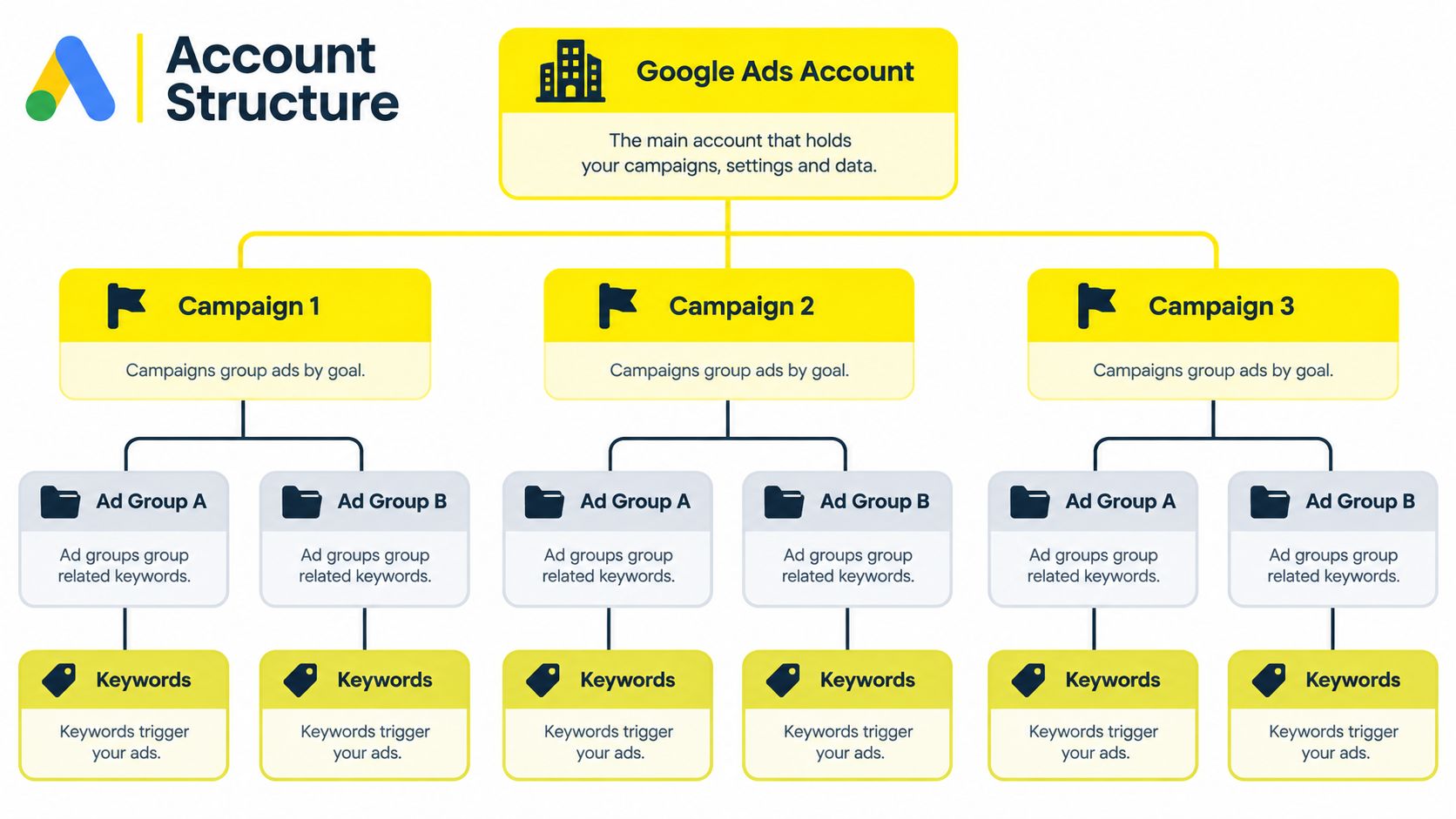
Start with a simple filing system. A campaign groups ads by a business goal and usually holds budget and location settings. Inside it, an ad group gathers closely related keywords. Under that, keywords trigger ads, and each ad should send people to a page built for that same intent.
This hierarchy shows how the layers nest inside each other.
Match Campaign Types to the Job
Search campaigns are the clearest starting point for most small firms. A plumber who needs local calls, a tax advisor who needs booked consultations, or a coach who needs qualified applications can bid on explicit searches and control the message tightly. You choose the terms, write the ads, and decide where clicks land.
Performance Max casts a wider net across Google placements and leans heavily on automation and creative assets. It can suit an e-commerce brand with a product feed and steady conversion data, but it gives you less keyword level control. On thin data, wide automation makes it harder to learn which searches created revenue.
Display reaches people while they're browsing other sites and apps, not while they're searching. That can support awareness or remarketing, but it shouldn't be confused with ready buyer demand. If your budget is limited and you need leads this month, mixing browsing traffic into a search effort muddies your reading of results.
Practical rule: Build one focused campaign well before you split a modest budget across many campaigns that each learn too slowly.
Pick one service or product line first. Give it its own campaign, group its searches by intent, and write ads that could only belong to those groups. That focus gives you cleaner data when you later decide what to expand.
Setting a Budget and Choosing a Bidding Strategy
There's no honest universal budget number, because the right spend depends on what a customer is worth to you. Start from your economics, not from a platform suggestion. Work backward from average revenue per customer, your gross margin, and how many qualified leads you typically need to close one job.
If a job leaves healthy margin after labor and materials, you can afford a higher cost per qualified lead than a business selling a low margin product. If your team closes only a small share of inquiries, cheap form fills can still be expensive. Write down the most you can pay for a qualified opportunity and still profit. That ceiling keeps budget talks grounded when clicks get pricey.
This photo reflects where that math usually happens, at a desk with your real numbers open, not inside a recommendation tab.

When Automation Has Too Little to Learn From
Automated bidding isn't magic. It learns from the conversion data you feed it, and a small local account often produces far less data than owners assume. Google recommends data-driven attribution only when an account has at least 200 conversions and 2,000 ad interactions within 30 days in supported networks. Many local services, coaches, and early stage stores won't meet that bar.
Below that volume, automated recommendations can look precise while resting on sparse, unstable signals. One unusually good week or a handful of low quality leads can steer bids in the wrong direction. That's why starting with conservative manual CPC or a tightly controlled maximize clicks approach can make sense while you protect search term quality and define what a real conversion means.
The walkthrough below helps you see how bidding choices appear inside the account before you change them on live spend.
Move toward Maximize Conversions only after your primary conversion reflects a qualified action and the volume is steady enough to judge. If you switch early and costs jump, you won't know whether the strategy failed or the data was too thin. Graduate in stages, and keep a human ceiling on what a lead is worth.
Keyword Targeting That Captures Ready Buyers
Two searches can mention the same trade and mean opposite things. "Emergency plumber near me" signals a person who wants a phone number now. "How to fix a leaking pipe" signals a person who wants instructions and may never hire anyone. Paying the same for both is how a careful owner ends up funding homework.
Sort keywords by intent before you worry about volume. Transactional terms often include a service, a location, and words like near me, book, quote, or cost. Informational terms often start with how, why, or what. Both can have a place in marketing, but they shouldn't share an ad group, an ad promise, or the same landing page call to action.
Use Match Types as Guardrails
Exact match keeps you closest to the meaning you chose. Phrase match allows searches that keep your phrase's meaning with words around it. Broad match gives Google the most freedom to find related searches. Freedom is useful only when your conversion data is clean enough to teach the system which related searches became customers.
For a new account, tighter matching protects a small budget and produces a search terms report you can read. Open that report regularly. It shows the queries that triggered clicks, which often differ from the keywords you picked. When you spot job seekers, freebie hunters, DIY research, or services you don't offer, add them as negative keywords so you stop paying to be misunderstood.
Separate emergencies from research: Give urgent terms their own ad group with call focused copy.
Put location in the promise: Local searchers want reassurance you serve their area.
Qualify in the ad: Mention who the service is for, booking steps, or pricing cues when appropriate so poor fit clicks self select out.
Good keyword work feels less like collecting traffic and more like writing a guest list. You're deciding who should walk through the door, who should read a guide instead, and who shouldn't be invited at your expense.
Landing Pages and Conversion Tracking That Capture Revenue
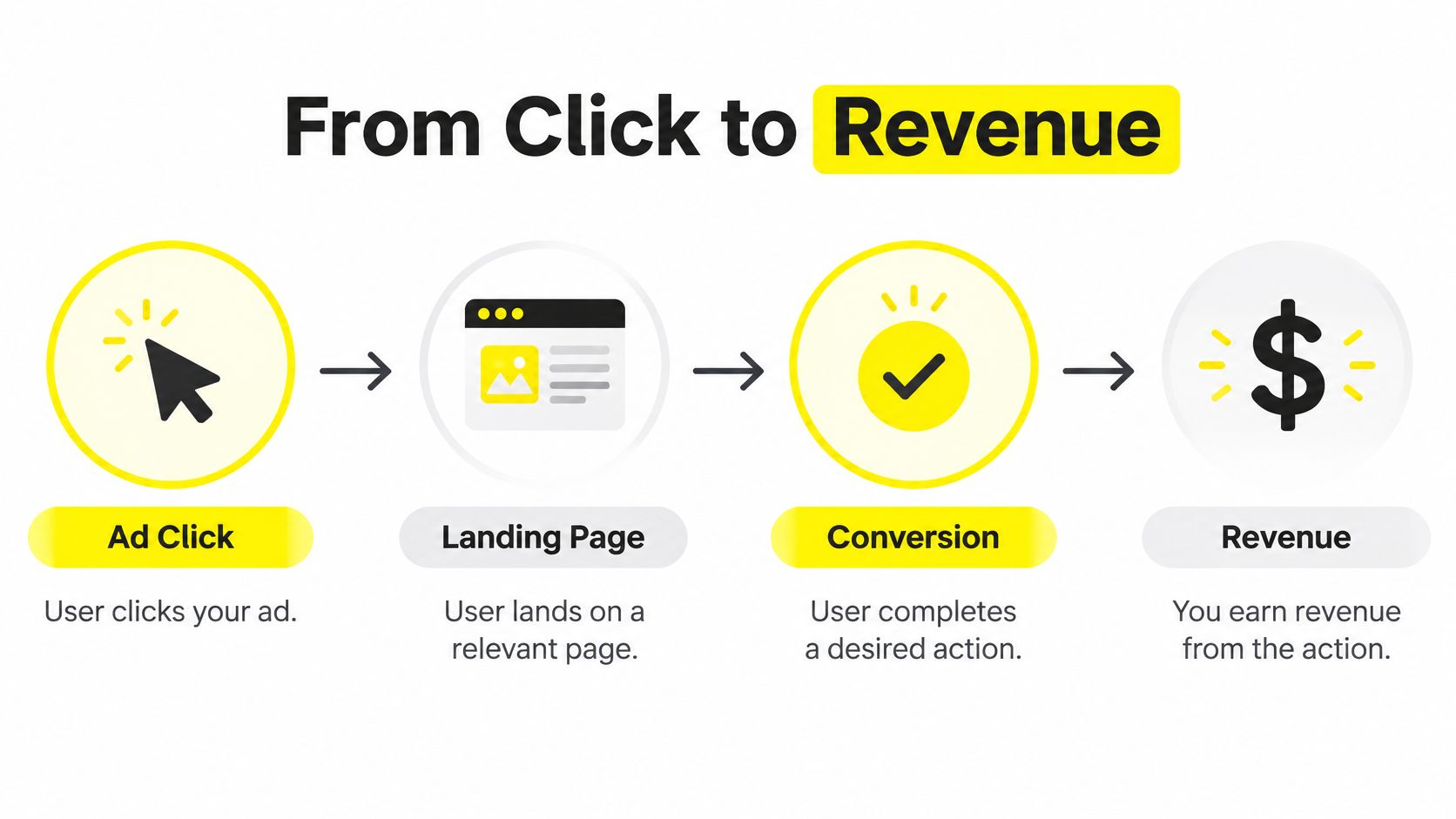
Sending paid traffic to your homepage asks visitors to do your organizing for you. A person who searched for one treatment, one repair, or one consultation lands on a page about everything you do, then has to hunt for proof you can help with that specific need. Many won't bother. A dedicated landing page repeats the ad's promise, answers the obvious objections, and puts one clear next step in front of them.
Speed and mobile usability matter for the same reason. A slow page or a buried phone button doesn't just annoy visitors. It weakens the experience Google evaluates and lowers the share of clicks that become enquiries, which means each real lead costs you more.
This flow shows why the page and the measurement belong in the same conversation.
Connect the Click to the Offline Sale
Browser based tags miss things, especially when revenue happens later by phone, in a CRM, or in person. Enhanced Conversions can improve measurement by supplementing conversion tags with consented, first-party customer data such as email address, phone number, name, or address, after the data is normalized and hashed with SHA-256 before transmission. Google then matches that hashed data to signed in account data to recover attribution a tag alone may miss.
For lead generation, Enhanced Conversions for Leads connects imported offline outcomes to the original ad interaction. Capture a unique lead ID with consented contact details, pass it into your CRM, then upload stages such as qualified, booked, and won with revenue values. Bidding can then learn from qualified leads or closed revenue rather than cheap form fills. Teams reviewing the wider measurement setup can also explore how to lift signups and sales with tracking so on site actions and backend outcomes aren't judged in isolation.
A form submission is a clue. A qualified, booked, and paid outcome is evidence.
Be patient after setup and don't judge incomplete data too early. Build the chain first, click to page to lead ID to CRM outcome, then use it to calculate cost per qualified opportunity and return on ad spend from real revenue.
Reading Your Metrics and Knowing When to Scale
Your weekly review should answer a business question, not admire activity. Clicks and impressions tell you ads ran. They don't tell you whether the right people called, booked, or bought. Owners who want a reporting reference point can compare their layout with Google Ads reporting examples, then replace vanity columns with qualified outcomes.
Keep three reporting layers separate, especially if you close deals offline. Google permits advertisers to use first-party data from websites, apps, physical stores, and offline conversion data, but requires appropriate customer consent and compliance with applicable privacy laws. For med spas, home services, real estate, and tax advisors, platform conversions, qualified opportunities, and realized revenue can each produce a different apparent cost per acquisition. The cheapest layer often looks best and misleads most.
Key Metrics for Small-Business Google Ads
Metric | What It Measures | Why It Matters |
|---|---|---|
Conversion rate | Share of clicks that complete your primary action | Shows whether intent, ad, and page agree |
Cost per qualified lead | Spend divided by leads your team accepts as fit | Connects spend to pipeline quality, not form volume |
Profit per lead | Margin expected from leads after close rate and costs | Tells you if growth is worth funding |
Return on ad spend | Revenue compared with ad spend | Useful for sales when revenue is tracked honestly |
Impression share | How often you appear for eligible searches | Helps judge if budget or rank limits reach |
Scale when qualified lead cost stays inside your ceiling, your CRM confirms revenue, and search terms remain on topic after a budget rise. Don't scale because a platform score improved or one week looked strong. Collect only the personal data you need, document consent and retention, and upload the fields required to prove outcomes. Trustworthy, minimal data beats a messy pile of signals you can't defend.
If your Google Ads spend isn't yet tied to qualified leads and backend revenue, Wojo Media can audit your offer, landing pages, campaign structure, and tracking so scaling decisions rest on profit, not clicks. Visit Wojo Media to book a free demo call and get a custom paid ads strategy for your business.
Comments