
Google Ads Keyword Match Types: Which to Use in 2026

What if the question isn't which match type is best, but what evidence your account needs before you trust a wider one? Most advice about Google Ads keyword match types gives you a fixed ranking, as if exact always wins and broad always wastes money. That ranking skips the control system you have, which is your search term data, your conversion tracking, and your negatives.
Think of match types as door policies for a venue. Exact match checks names closely, phrase match lets in the right group with a little flexibility, and broad match opens the door to anyone who looks relevant. You don't pick one policy forever. You tighten or loosen it based on who's walking in and who's buying something once they're inside.
Match Types at a Glance
Start with the chart below, then use it as a map for everything that follows. The running shoes example stays constant, so you can see how one idea gets wider or narrower as the punctuation changes. If you want a second walkthrough of the same choices, you can compare broad, phrase, and exact match side by side.
Match type | Syntax | Reach | Example query that triggers it |
|---|---|---|---|
Broad match | running shoes | Widest, includes related and implied searches | trail running gear |
Phrase match | “running shoes” | Same meaning, extra words allowed before or after | best running shoes for flat feet |
Exact match | [running shoes] | Narrowest, same meaning or close variants | running shoe |
Negative broad | -free | Blocks any search containing the word | free running shoes (blocked) |
Negative phrase | “free shipping” | Blocks searches with that phrase in that order | free shipping on running shoes (blocked) |
Negative exact | [free shipping] | Blocks only the exact wording and close variants | free shipping (blocked) |
How the reach stacks up
Google describes this structure as cumulative in its Google Ads match type help guide, where phrase match can reach the searches available to exact match plus additional searches, and broad match can reach both of those plus further related queries. Picture three nested circles. Exact sits in the center, phrase wraps around it, and broad wraps around both.
That nesting explains Google's furniture example. An exact keyword such as [furniture store] can match a closely equivalent query such as “home furnishing shop,” while broad match may also reach related searches such as “home decor” or “cream color leather sectional.” The words don't need to match letter for letter anymore. The meaning does the work.
The narrower the type, the more control you keep over spend, and the fewer searches you can reach.
Negatives work in reverse. They're your block list. A broad negative like -free stops any search containing that word, which is powerful and risky. Phrase and exact negatives block only the specified wording, so you use them when one precise phrase wastes money but nearby wording still converts.
Read the table as a trade off, not a league table. For e-commerce, local services, or lead generation, your match type decides how much query variation can trigger an ad before negatives, bidding, and conversion data start steering the result.
Close Variants and the Search Terms Review Loop
Your exact match keyword isn't literal anymore, and that's where most advertisers get confused. You type brackets around a keyword, you expect only that exact wording to trigger your ad, and then the bill shows clicks from searches you never wrote down. Those clicks usually come from close variants.
Keep the door policy analogy in mind. Close variants are guests who spell their name slightly differently but still belong on the list. Google says all keyword match types are eligible to match close variants by default, with no opt-out, according to its Google Ads close variants guide. You can't switch this off. You can only review what it brings you and respond.
What counts as a close variant
Variants can include misspellings, singular and plural forms, abbreviations, accents, and removed function words. They can also include stemmed forms such as “floor” and “flooring,” implied terms, and, in supported languages, synonyms or paraphrases such as “bathing suits” matching “swimming suits.” Some of those searches are valuable. Some aren't. The report tells you which is which.
Keyword | Query that can still trigger it | Variant type |
|---|---|---|
floor | flooring | Stemmed form |
shoes | shoe | Singular and plural |
running shoes | runnign shoes | Misspelling |
bathing suits | swimming suits | Synonym in supported languages |
running shoes | shoe for runners | Paraphrase with implied terms |
The Search terms report labels this traffic as “Exact match (close variant)” or “Phrase match (close variant)”, so you can compare the keyword in your account with the query a person typed. That distinction matters because your keyword is your intention, but the search term is what you paid for. Reviewing one without the other leaves you guessing.
The weekly review loop
Run this loop on a schedule, not when spend already looks wrong.
Open the Search terms report and filter by match type. You want the keyword and the actual query behind every click, because waste hides in the gap between them.
Sort by cost first, then by conversions. High spend with no outcome gets your attention before low spend curiosities do.
Check qualified leads or revenue where your CRM allows it. A cheap form fill that never buys isn't a win, so connect queries to downstream outcomes when you can.
Flag recurring non-commercial themes. Words like free, jobs, DIY, and careers often signal someone who wants information or work, not your product or service.
Add negatives at the right level. Use ad group negatives for theme specific waste and campaign negatives for waste that appears across the whole account.
Pick the negative type deliberately. Choose broad for a word that should never appear in a paying search, and exact when you only want to block one specific query.
Promote profitable variants. When a variant converts repeatedly, move it into its own keyword or ad group theme with ad copy that speaks to that wording.
Repeat weekly. Variants multiply as you scale, so a list that's clean this month won't stay clean on its own.
Practical rule: Judge a search term by what it produced, not by whether it looks like your keyword.
Vertical specific starter lists can speed up step four, especially in trades where job seeker and supplier searches repeat constantly. A ready made roofing negative keyword list for 2026 is one example of a prebuilt exclusion set you can adapt to your own services. Don't paste any list in blindly, though. Check each word against what you sell first.
Three slips that cost money
Blocking a product you sell. A broad negative added in a hurry can shut off profitable searches that happen to contain that word.
Assuming brackets block everything. Exact match still accepts close variants, so skipping the report means you never see the variation you're funding.
Skipping lead quality checks. If you only look at cost per lead, you'll protect cheap queries that produce leads your sales team can't close, and you'll cut pricier queries that produce revenue.
Treat negatives as governance based on observed searches, not assumptions. Each review cycle either removes a recurring leak or promotes a proven query into tighter, better messaged coverage. That's how reach grows without letting efficiency slip a little more every week.
Phrase Match After the 2021 Change
Phrase match today reaches more searches than phrase match did a few years ago, and older accounts still carry the fingerprints of that change. The image below shows the kind of account review that surfaces those older keywords.
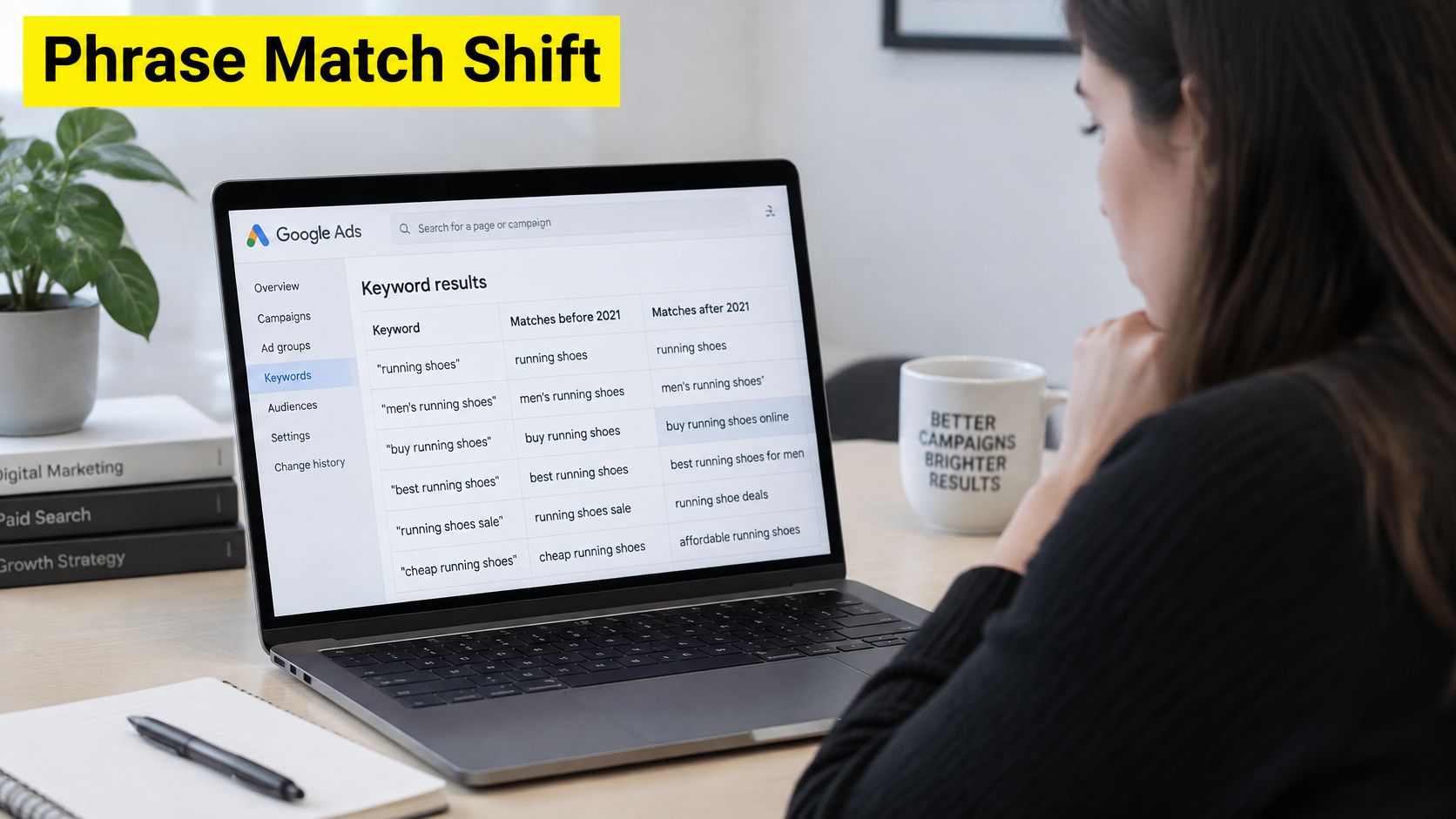
According to the Google Ads phrase match update announcement, Google began incorporating broad match modifier behavior into phrase match in February 2021, and by July 2021 the updated phrase behavior had rolled out across all languages. From July onward, advertisers could no longer create new broad match modifier keywords using the legacy plus sign notation, such as +running +shoes. Existing modifier keywords continued serving, but they would behave like phrase match keywords rather than keeping the former standalone behavior.
What that means in a live account
Say an older account still holds +roof +repair from years ago. The owner remembers building it to insist both words appear, in any order, with close variations allowed. That memory is out of date. The keyword now behaves as phrase match, so the searches it attracts follow phrase logic, and managing it as if the old rules apply leads to wrong conclusions about why certain queries appear.
Google characterized the update as combining phrase match control with broad match modifier expanded reach, which is a fair plain language summary. You manage fewer distinct positive match behaviors now. In exchange, phrase covers more ground than it used to, which makes your search term reviews more important, not less.
The short video below walks through how these matching behaviors look in practice.
Do one audit task in any inherited account. Export your keywords, search for the plus sign notation, and list every legacy modifier keyword you find. For each one, decide whether it stays as phrase match or gets rebuilt around a clearer intent, then confirm your choice against the actual queries it has attracted recently.
When Broad Match Is Safe to Trust
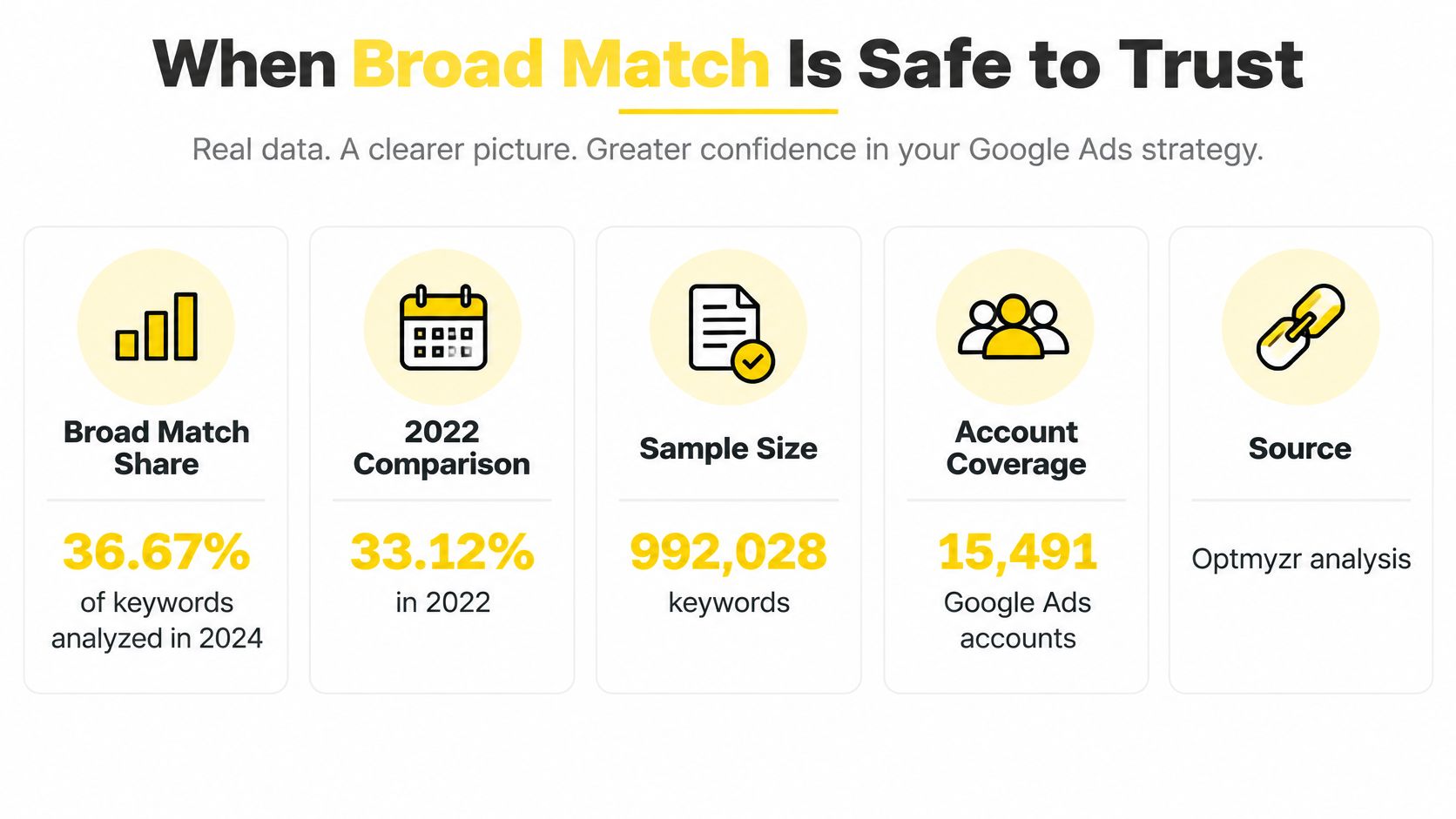
Broad match is getting more popular, and popularity is a weak reason to use it. In 2024, broad match keywords represented 36.67% of keywords analyzed, up from 33.12% in 2022, according to Optmyzr's analysis of 992,028 keywords across 15,491 Google Ads accounts. That tells you what advertisers are doing. It doesn't tell you what works in your account.
The performance picture is less flattering. In 2023, exact match outperformed broad match on return on ad spend in 74.10% of the Google Ads accounts examined by Optmyzr, while broad match performed better in 25.90%, as reported in Optmyzr's State of PPC study. Broad wins in a real minority of accounts. The useful question is what those accounts have in place before broad earns budget.
Metric | Value | Year |
|---|---|---|
Broad match share of keywords analyzed | 33.12% | 2022 |
Broad match share of keywords analyzed | 36.67% | 2024 |
Accounts where exact match beat broad match on ROAS | 74.10% | 2023 |
Accounts where broad match beat exact match on ROAS | 25.90% | 2023 |
Five readiness tests
Don't give broad match serious budget until each of these passes.
Stable primary conversions. Your main conversion action fires reliably and means the same thing every time, so the bidding system learns from real outcomes.
Accurate value tracking. Revenue or lead values reaching Google Ads reflect what a conversion is worth, not a placeholder number.
Enough volume to learn. Smart Bidding needs a steady flow of conversions, because sparse data produces erratic bids on unfamiliar queries.
Clear negative keyword rules. Your exclusion lists and review habit already exist, so exploratory traffic hits guardrails from day one.
Profit based measurement. You judge results by qualified leads or gross margin, not surface cost per acquisition, so cheap but useless conversions don't fool you.
If bid decisions feel shaky before you widen targeting, it's worth learning how to maximize ROI with smarter keyword bids so bid strategy and match type pull in the same direction. Broad match with weak bidding discipline is just expensive exploration.
Why broad can scale when you're ready
Google states that broad match can use all available signals to interpret user intent while exact and phrase face additional matching restrictions, and that Smart Bidding adjusts bids at the query level rather than only at the keyword level, in its Google guide to reaching the right customers. It also says broad match is eligible for contextual matching against both the query and AI response, whereas exact and phrase are limited to direct commercial intent queries.
Broad match isn't a default setting. It's a privilege your tracking earns.
That last point matters for planning future coverage, because traditional match type charts don't capture AI powered Search experiences. Still, none of this proves broad will outperform in your account. Ask whether your margins and lead handling can tolerate exploratory traffic while the system learns. If every wasted click hurts, you aren't ready yet, and that's a legitimate answer.
Choosing a Match Type for Each Goal
Goals change the right answer, so use this table as a starting mix rather than a permanent structure. Each row pairs a situation with a sensible opening position, the reason behind it, and the risk you should watch first. Your search term data will move you away from these defaults over time, and that's expected.
Goal | Starting match mix | Reason | Main risk |
|---|---|---|---|
New account, unknown demand | Phrase plus exact on core terms | Controlled reach while data builds | Limited search volume |
Protect high-value terms | Exact match | Tight control over spend | Missed variants and paraphrases |
Scale proven conversions | Broad match with Smart Bidding | Reaches related and implied queries | Needs reliable conversion tracking |
Local lead generation | Phrase match | Keeps service intent, excludes unrelated queries | Job-seeker and DIY queries |
E-commerce product terms | Exact and phrase by product, broad for discovery | Clean product intent | Long-tail coverage gaps |
Reading the rows
A new account has no conversion history, so phrase plus exact on core terms keeps reach controlled while you learn which wording real buyers use. You'll leave some volume on the table at first. That's cheaper than paying to discover, through broad match, every irrelevant way people phrase a search in your market.
High value terms deserve exact match when a single wasted click costs real money, such as legal, medical, or emergency service searches. Tight control protects budget, but you'll miss paraphrases that a competitor's phrase keyword catches. Review your auction and query data before assuming narrow means safe.
For local lead generation, phrase match usually hits the balance. It keeps service intent intact, so “plumber near me” style searches with extra words still qualify, while job seeker and DIY wording is easier to spot and exclude. A med spa, barbershop, or home service business needs qualified calls, not curious browsers, and phrase keeps that filter workable.
E-commerce works best split by product. Give proven products exact and phrase coverage so intent stays clean, and reserve broad for discovery in a separate, capped campaign. That separation stops an experimental keyword from spending the budget your best seller needed.
Pitfalls that undo a good mix
Competing with yourself. Running broad and exact versions chasing the same query inside one ad group muddies which keyword deserves credit and complicates bid decisions.
Choosing by impression volume. A match type that shows your ad most often isn't the one making you money, so judge by profit, not exposure.
Copying one keyword list everywhere. Pasting the same list into every campaign creates overlap, scattered data, and budgets fighting each other.
Revisit the mix after each reporting cycle. A goal that justified caution at launch may support wider reach once conversion data is stable, and a broad test that looked promising may need pulling back. The table gets you started. Your own query data decides what happens next.
Set Up Your First Match Type Plan
You can run a solid first plan yourself with one campaign, a spreadsheet, and a recurring calendar block. The steps below turn everything you've read into a sequence you can finish this week. They work the same whether your account is brand new or years old.
Build the plan in five steps
Pick one campaign goal. Choose a single row from the goal table and commit to it, because a campaign chasing new demand and protected high value terms at once serves neither well.
Build separate phrase and exact ad groups. Give each ad group one tight theme and its own ad copy, so a search about price sees price language and a search about speed sees speed language.
Add broad match only after readiness passes. Stable conversions, accurate values, enough volume, clear negatives, and profit based measurement all need to be true before broad gets budget.
Schedule your reviews now. Block a weekly slot for the Search terms report and a monthly slot to examine the close variants it reveals, then protect both like client meetings.
Measure qualified outcomes. Score the plan on qualified leads or gross margin, since a falling cost per acquisition built on poor fit leads is a step backward.
Checkpoint: After each reporting cycle, compare actual search terms with your starting mix and adjust where profitable queries or waste have appeared.
Keep a simple change log as you work. Record the date, the query, the action you took, and whether you added a negative, promoted a keyword, or changed a match type. Four columns in a spreadsheet are enough. Without that log, you'll re-litigate the same queries next month because nobody remembers why a negative exists.
Say your first cycle surfaces a phrase query that produces three qualified leads while your exact core term produces one. Your log tells you to promote that query into its own exact keyword with copy specific to it, and to watch whether the original phrase keyword keeps finding more like it. That's the control system working. Small, documented adjustments beat periodic account rebuilds.
If you'd rather pressure test the plan before spending, we can help you think it through. Our team optimizes a client's offer and guarantee, then builds a landing page and ad copy to match, so the traffic your match types admit lands somewhere built to convert it. Strong targeting paired with a weak page still leaks money.
Set a review date four weeks out before you launch anything. Plans without a scheduled checkpoint drift, budgets follow them, and the queries you meant to exclude keep billing you.
If your match type mix needs a second set of eyes, a free demo call with Jason or a growth manager is the first step to building a custom paid ad strategy around your goals. We'll look at your search term data, your tracking, and your offer together, then show you where tighter control or wider reach would pay off. Visit Wojo Media to book your call and turn your Google Ads keyword match types into a system you control.
Comments