.png)
Google Ads Lead Form Extensions: The Complete Guide

Google Ads lead form extensions are native, frictionless forms inside the ad experience, so prospects can submit high-intent contact details without visiting a landing page. Google stores those submissions for 60 days, while manual CSV downloads cover only the previous 30 days, so aggressive CRM syncing isn't optional.
That retention gap creates a counterintuitive risk. The form may capture a lead in seconds, but the campaign can still lose its commercial value if nobody routes, qualifies, and follows up with that lead before the export window narrows. Native capture removes friction from the prospect's journey, not from your operations.
What Are Google Ads Lead Form Extensions
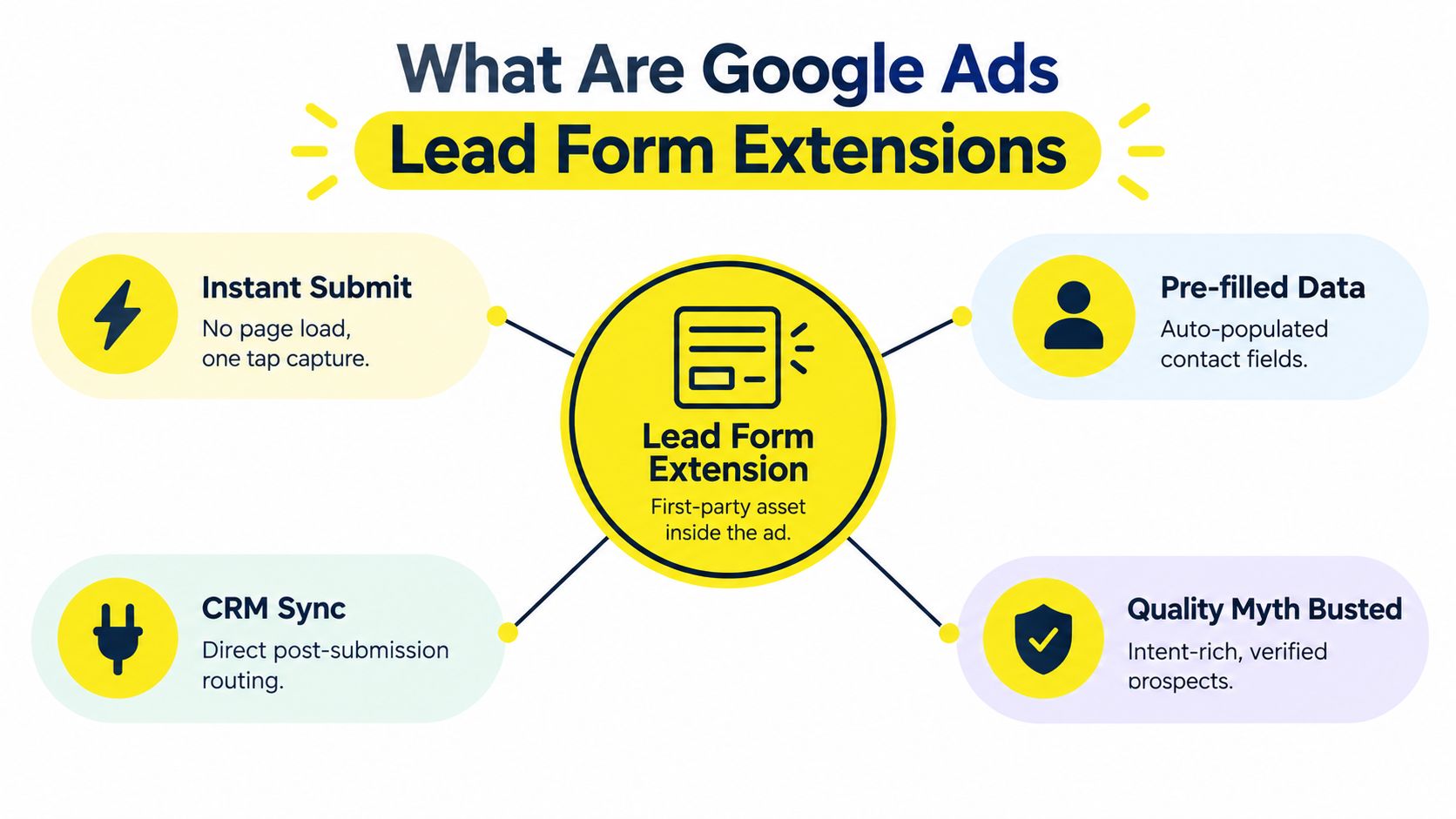
The biggest misconception about native forms is that fewer clicks automatically mean lower-quality leads. In practice, a form that removes a slow page load, unnecessary navigation, and repeated typing can make it easier for an interested prospect to act while their intent is still fresh.
Google Ads lead form extensions, now commonly called lead form assets, let a person submit information directly within the Google Ads experience. The form can use contact details already associated with the user's Google account, which reduces manual entry. The advertiser receives the submission through an available delivery method, such as a CRM connection, webhook, or export.
The important distinction is between friction and qualification. Friction is every obstacle between interest and submission. Qualification is the information your sales team needs to judge fit. Removing friction usually helps completion, while adding carefully chosen qualification questions can improve the usefulness of each record. The operator's job is to reduce the first without eliminating the second.
Why native capture changes user behavior
A conventional funnel asks someone to click an ad, wait for a page, understand the offer, find the form, enter information, and submit. Each step creates an opportunity to abandon the process. A native form compresses that path into an in-ad action, which is particularly useful when the offer is simple and the searcher already understands the problem.
That doesn't mean every submission represents buying readiness. An easy form can attract people who are curious, comparing providers, or responding to an offer without a clear timeline. The form should therefore make the next action explicit. “Request a consultation” sets a different expectation from “Download the guide,” even if both collect an email address.
Practical rule: Treat the native form as a conversion surface, not as a complete qualification system.
The asset is standardized by design
Google constrains the form structure. Required components include the business name, call-to-action type, headline, description, and privacy-policy URL. Custom question volume is capped at 5, and the API supports only one webhook delivery method, according to Google's lead form asset documentation.
Those limits can feel restrictive if you're used to building forms in HubSpot or a custom landing-page platform. They also create consistency. A standardized payload is easier to map into a CRM, score in an automation workflow, and compare across campaigns. For broader lead-generation planning, SnapDial VoIP lead generation offers useful context on how capture and follow-up channels fit together.
The format has also matured beyond a short-lived test. Google introduced lead form extensions in beta on October 30, 2019, and later announced a broader rollout for Display ads on December 7, 2020, as documented in Google's support announcement. That progression matters because advertisers should evaluate the asset as part of campaign architecture, not as an experimental creative extra.
Real-World Use Cases Across Industries
A local service company usually doesn't need a long brand story before asking for contact information. Someone searching for a plumber, electrician, or HVAC provider often wants to know whether the business serves their area and whether someone will respond. A native form can ask for the person's name, phone number, location, and the type of service required, then pass the request to the scheduling team.
The form still needs a credible promise. “Request a repair estimate” communicates a useful next step, while “Contact us” makes the prospect do more interpretation. The ad copy should establish the service context, and the form should collect only the details needed to route the inquiry.

Local services need routing more than volume
A home-services lead has an operational dimension that many advertisers overlook. The business may need to assign work by postcode, service type, urgency, or technician availability. A form that asks too little creates a follow-up conversation, but a form that asks too much reduces completion.
A practical configuration might use:
Service intent: Repair, replacement, inspection, or installation.
Location: City or postcode for territory assignment.
Contact method: Phone or email, depending on how the team closes work.
Urgency: A simple choice such as today, soon, or researching.
The advertiser doesn't need to turn the form into a diagnostic questionnaire. The form's job is to create a usable first record and trigger the right next step.
Coaches and consultants can sell the next conversation
A coach, consultant, or course creator can use a form to register interest in a webinar, request an assessment, or apply for a strategy call. The offer should match the funnel stage. A cold audience may respond to a practical workshop, while an audience searching for a specific service may be ready for a consultation request.
Qualification becomes more valuable when sales capacity is limited. A question about the applicant's main goal can help the team prepare for the call. A question about the desired start period can separate immediate opportunities from longer-term nurture prospects.
The mistake is asking for information the sales team won't use. Every field creates a cost in attention. If an answer doesn't change routing, messaging, or qualification, it probably doesn't belong on the first form.
E-commerce brands can use forms beyond direct checkout
E-commerce advertisers often think lead forms are only for service businesses. They can also support product drops, restock alerts, sample requests, wholesale inquiries, and educational buying guides. The form becomes useful when the customer isn't ready to purchase immediately but has expressed a specific product-related interest.
For example, a specialist retailer could collect inquiries from buyers comparing products that require consultation. The form might ask which category they're considering and whether they're buying for personal or business use. That information can determine the follow-up sequence without forcing the prospect through a generic product page.
Native forms work best when the submitted information has a clear destination. If the record just enters an inbox with no owner, the campaign is capturing activity rather than building a dependable revenue process.
The Data Architecture and Hidden Constraints
Lead form assets are structured data-collection systems, not ordinary creative. Eligibility rules, fixed fields, delivery limits, and finite retention create operational risks that can waste otherwise qualified demand.
Campaign architecture determines whether the asset can produce reliable signals. Google requires campaigns to optimize toward a lead form conversion goal, while policy requirements cover eligible verticals, account history, and a privacy-policy URL within the form. Search placements that open directly into a lead form, along with Display and Video use, also require substantial account-spend thresholds. Availability at scale therefore depends on account maturity. Set up the asset only after conversion tracking works consistently and Smart Bidding has dependable conversion data.
The retention window is an operations problem
Google states that lead form assets store lead data for 60 days, while manual CSV downloads cover only the previous 30 days, according to this explanation of Google Ads lead form retention. Those limits create two separate failure points.
A team using manual exports can lose access to submissions that remain stored but fall outside the standard download range. A successful export also leaves follow-up work unresolved. The spreadsheet may preserve a name and contact detail, but it does not assign an owner, trigger a response, or show Google which leads became customers.
A lead is not operationally captured until your team can find it, contact it, qualify it, and connect it to the campaign that generated it.
Set an export or integration process before launch. Retention is a workflow requirement, not an administrative detail.
Fixed structure limits flexibility
The API requires core fields including business name, call-to-action type, headline, description, and privacy-policy URL. Custom questions are limited to 5, and the form structure supports only one webhook delivery method, according to Google's API reference for lead form assets.
Those constraints affect governance. Campaign-level forms can give teams more control when qualification logic differs by offer. Google permits only one account-level lead form asset at a time, so ownership and change control matter. Altering a question can change CRM data, scoring rules, and the information sales representatives expect.
The background image must use the supported size of 1200 by 628 pixels, and the privacy-policy URL is required, as stated in Google's configuration guidance. Treat the asset like an API integration. Submit test leads, inspect every field, confirm the privacy link, and verify that the destination system receives the record before spending at scale.
Optimizing Form Fields for Maximum Conversion
A high-converting lead form collects enough information for the next sales decision, then stops. Cutting every optional field can produce more submissions, but it can also leave representatives without the context needed to qualify or route them. The right balance depends on what happens immediately after submission.
Start with that operational step. If a representative calls quickly, a dependable phone number supports the process. If the next action is sending a resource, email may be the only contact field that matters. Teams serving defined territories may gain more from location than from a long description of the prospect's needs.
Build the first version around four decisions
Use the form to answer four questions:
Who is the prospect? Name gives the record a usable identifier and makes follow-up more personal.
How should the team contact them? Select the contact field that matches the actual sales workflow.
What do they want? A focused multiple-choice question usually creates cleaner routing data than an open-ended prompt.
Who owns the next step? Location, service category, or business type can help assign the lead.
Write the headline around the benefit of submitting. “Request a property valuation” tells the prospect what they receive, while a generic company statement does not. Use the description to remove uncertainty. State whether someone will call, email, or send available options.
Qualification has a conversion cost
Custom questions improve lead usefulness only when the answers change what the team does next. A service category can route the record. A project timeline can determine follow-up priority. A budget question may fit a consultation offer, provided sales uses the answer in qualification or assignment.
Every added question creates another point where a prospect can hesitate, abandon the form, or enter inaccurate information. Avoid sensitive or intrusive questions in the first interaction unless the reason is clear and the answer has a defined operational use.
The strongest form does not create the most complete profile. It gives sales enough context to respond intelligently without turning an ad interaction into an application.
Test the form and campaign goal together
Set bidding toward the Google lead form conversion goal so submissions provide the campaign's primary optimization signal. A concise form cannot fix a campaign trained on a different action, and a low-friction form can still generate wasted spend if the resulting records never reach the sales process.
Test the entire path before launch:
Submit: Confirm the form accepts the intended fields.
Receive: Check the CRM, webhook, or export destination.
Map: Verify that names, contact details, and answers populate the correct fields.
Assign: Confirm an owner or queue receives the record.
Respond: Test the first email, SMS, or call task.
Measure: Confirm the submission is recorded against the intended conversion goal.
Review campaign structure, targeting, and conversion settings alongside field count. This guide to stop wasting ad spend provides a useful checklist for that broader setup. A form can convert efficiently at the ad level while still wasting budget if lead delivery, qualification, or follow-up fails after submission.
Native Forms vs External Landing Pages
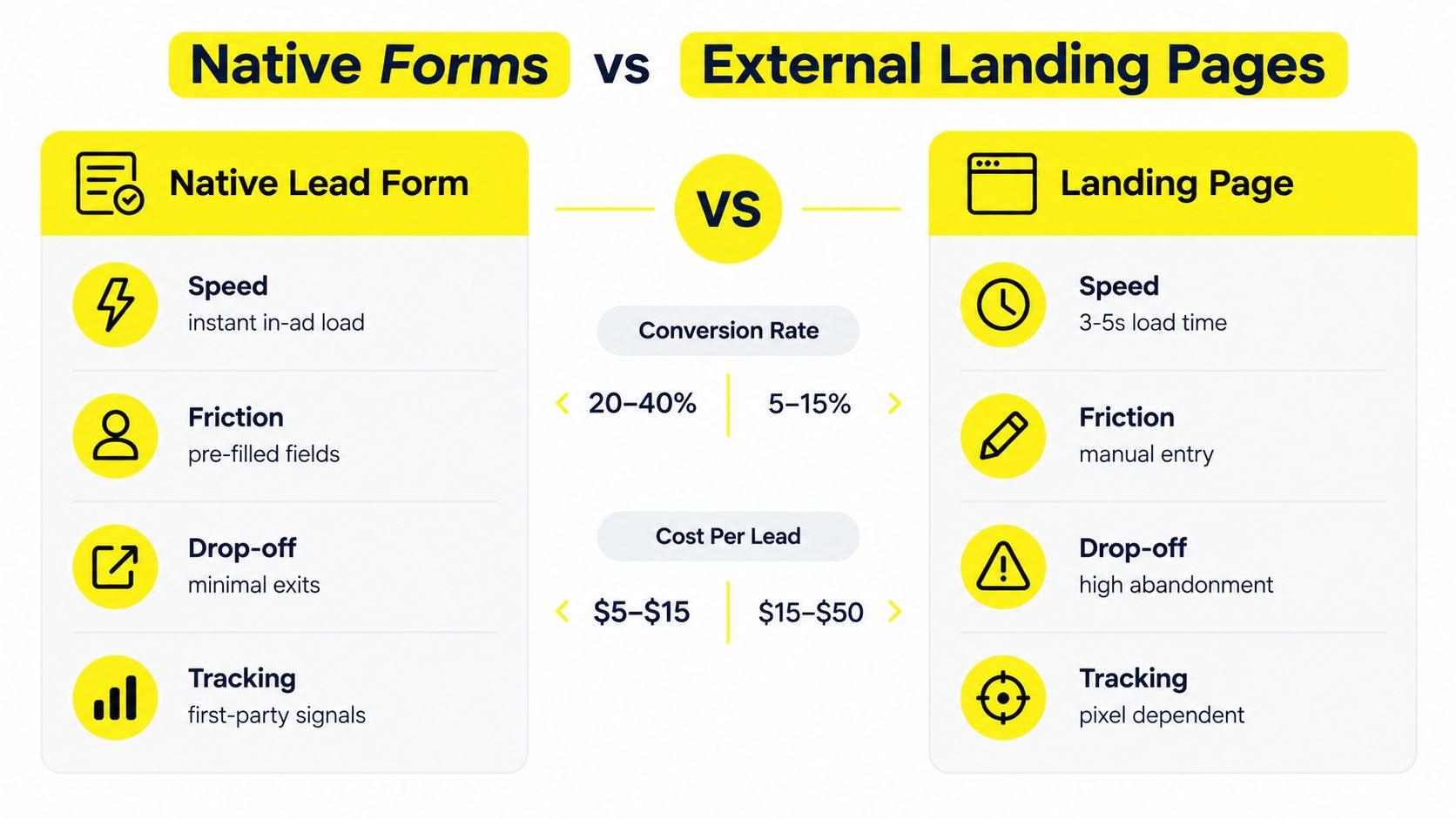
Native forms win when the prospect already understands the offer and the advertiser needs a fast path to contact. External landing pages win when the buyer needs education, proof, comparison, or a more deliberate decision before submitting.
Decision factor | Native lead form | External landing page |
|---|---|---|
Initial experience | Opens within the ad journey | Requires a page visit |
Information capture | Uses a constrained form structure | Allows broader form and page design |
Message depth | Limited headline and description space | Supports long-form explanation and proof |
Testing control | Focuses on asset and campaign variables | Supports page layout, copy, and form experiments |
Data operations | Requires dependable delivery and retention management | Usually connects directly to site and CRM systems |
Best fit | Clear offers and immediate inquiries | Complex decisions and high-consideration purchases |
Choose native when speed is the bottleneck
A native form is a strong candidate for quote requests, consultations, event registrations, and straightforward service inquiries. It removes the page experience from the critical path and can use pre-filled information, which reduces the work required from the prospect.
The trade-off is control. You can't rely on the form to tell a detailed story, demonstrate a complicated product, or reproduce every qualification workflow your website supports. You also need to treat Google's delivery and retention rules as part of the funnel.
Choose a landing page when trust does the selling
A landing page earns its place when the prospect needs evidence before sharing information. High-consideration services may require testimonials, case details, pricing context, process explanations, or compliance language. A page also gives the marketing team more room to measure behavior and adjust the experience.
That extra control creates more failure points. The page must load, the message must match the ad, the form must work, and tracking must survive the journey. A native asset avoids some of those dependencies but gives up much of the page-level control.
The sensible decision isn't ideological. Run the native form where a concise offer can produce a useful conversation, and keep the landing page where explanation and trust materially affect qualification. Tools such as the Kiwiform Google Forms alternative can also help teams think through the difference between a quick data-collection experience and a more flexible form workflow.
Routing Leads into Your Revenue Engine
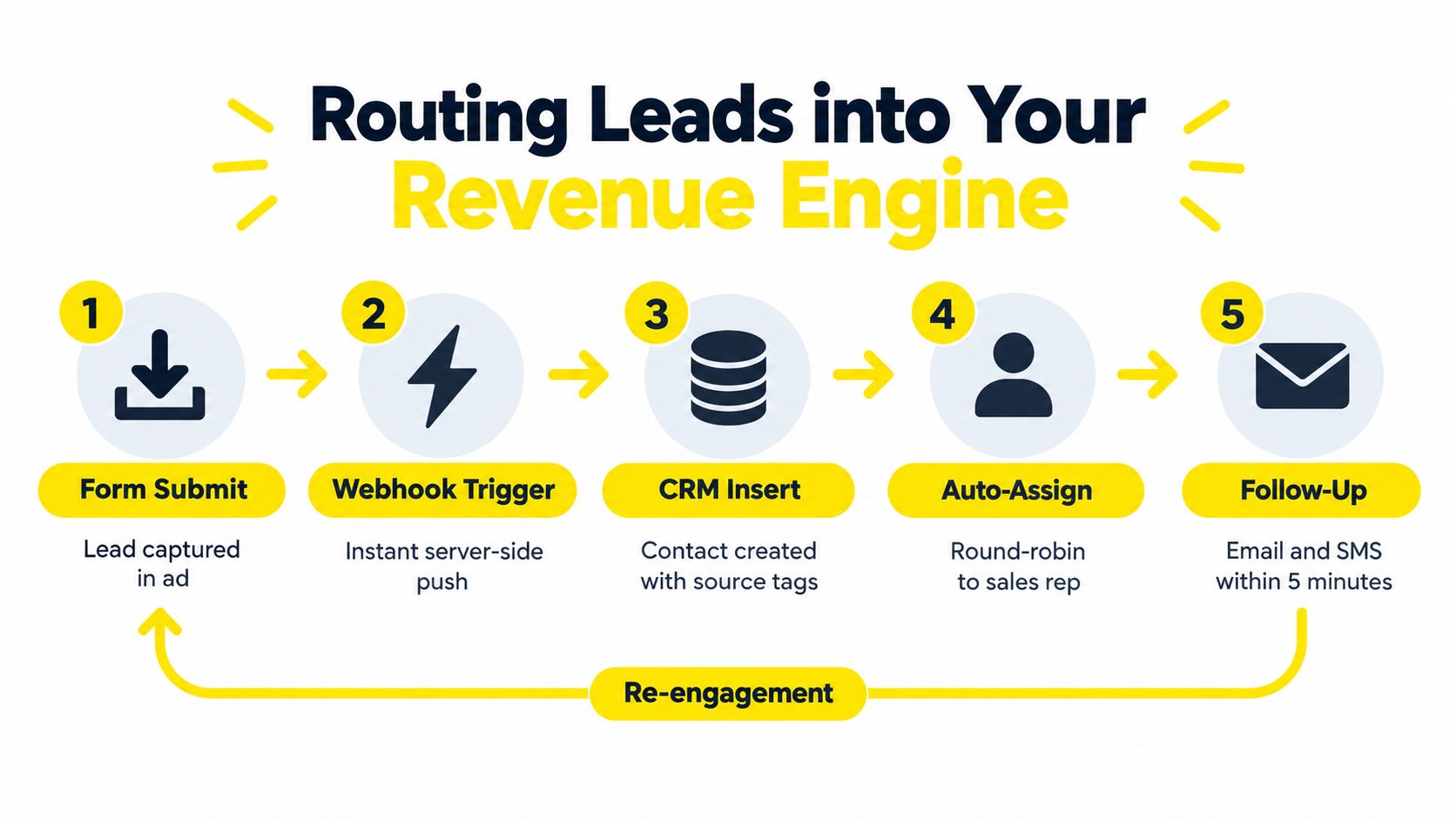
The form submission is the midpoint, not the finish line. A campaign produces business only when the record moves from Google Ads into a system that can assign ownership, preserve source information, trigger follow-up, and record what happened next.
Google supports structured lead delivery, including webhook-based routing and API access. A webhook can push the submission to an endpoint, where your system validates the request, maps the fields, and inserts the contact into a CRM. That approach offers control, but it also creates an engineering responsibility. Someone must monitor failures, manage field changes, and test the endpoint when the form is edited.
Design the handoff before launching
A reliable routing design answers five questions:
Where does the record enter? Select the CRM, data warehouse, sales inbox, or integration layer that owns the contact.
Which fields are preserved? Keep the campaign, form, submission time, contact details, and question answers.
Who receives responsibility? Use territory, service type, or round-robin rules to assign an owner.
What happens immediately? Trigger a confirmation message, task, call alert, or nurture sequence that matches the offer.
How is quality recorded? Feed qualified and closed outcomes into reporting so the account isn't judged only by raw submissions.
The one-webhook constraint makes testing particularly important. Send test data before launch, inspect the payload, and confirm that the receiving system returns the expected response. A successful form with a broken destination is worse than a visible error because the advertising account may continue spending while the sales team sees nothing.
Preserve the conversion loop
Google recommends optimizing toward the lead form goal, but a submission is still only an early signal. Your CRM should distinguish between a new inquiry, a qualified opportunity, a booked appointment, and a closed customer. Those stages allow the team to judge whether a campaign creates commercial value rather than merely filling a database.
Automated follow-up should be helpful and specific. A plumber can confirm the service request and ask for a convenient call time. A coach can deliver the promised registration details and explain the next step. A real estate professional can acknowledge the property inquiry and request the information needed for a valuation conversation.
Don't use automation to hide a weak offer or a slow sales process. Use it to protect the handoff while a person takes ownership. The form captures intent, the CRM organizes it, and the sales process determines whether that intent becomes revenue.
The final risk is historical. If teams wait to export, fail to test the webhook, or leave submissions unassigned, they can lose visibility inside the retention window described earlier. Build the sync before spending, test it with a real submission, and review the full path regularly.
Wojo Media helps brands connect Google Ads lead form extensions with broader paid acquisition, offer development, landing-page strategy, and backend measurement. If you need a practical plan for reducing capture friction while improving lead routing and qualification, visit Wojo Media to request a strategy conversation.
Comments