
Webinar Marketing Funnel: How to Build One That Converts

The registration page said 1,000 people had signed up. On the night, 430 showed, 180 stayed past the halfway mark, and two booked a call. The ad dashboard still reports a healthy cost per lead, the webinar platform emails a report with a different attendee number, and the CRM shows revenue that matches neither.
That mismatch is normal, and it's the reason so many webinar campaigns get judged wrongly. A webinar isn't one conversion. It's a sequence of stages, each with its own failure rate, and collapsing them into a single registration number hides which stage is broken.
For a tax advisor selling a planning review, a coach selling a group program, or a consultancy selling an audit, the webinar is the one asset that teaches at scale, surfaces buying intent, and hands sales a warm list in the same hour. It also fails more than any other campaign type you'll run. Set a target per stage and the failures stop being invisible.
The Webinar Funnel Stages and the Numbers to Track
A webinar can attract a thousand registrations and still put fewer than half that number in the live room. Livestorm's 2025 benchmark, based on 33,786 webinar sessions, 3,199 organizations and 7,062,572 registrations worldwide, found a 47.7% live attendance rate, or roughly 83 attendees from an average of 175 registrants per webinar (Livestorm's 2025 webinar benchmark report). At that rate, 1,000 registrations produce about 477 live attendees, before replay views.
The registration count measures traffic capture, not how many people hear the offer. Treat each handoff as its own conversion point.
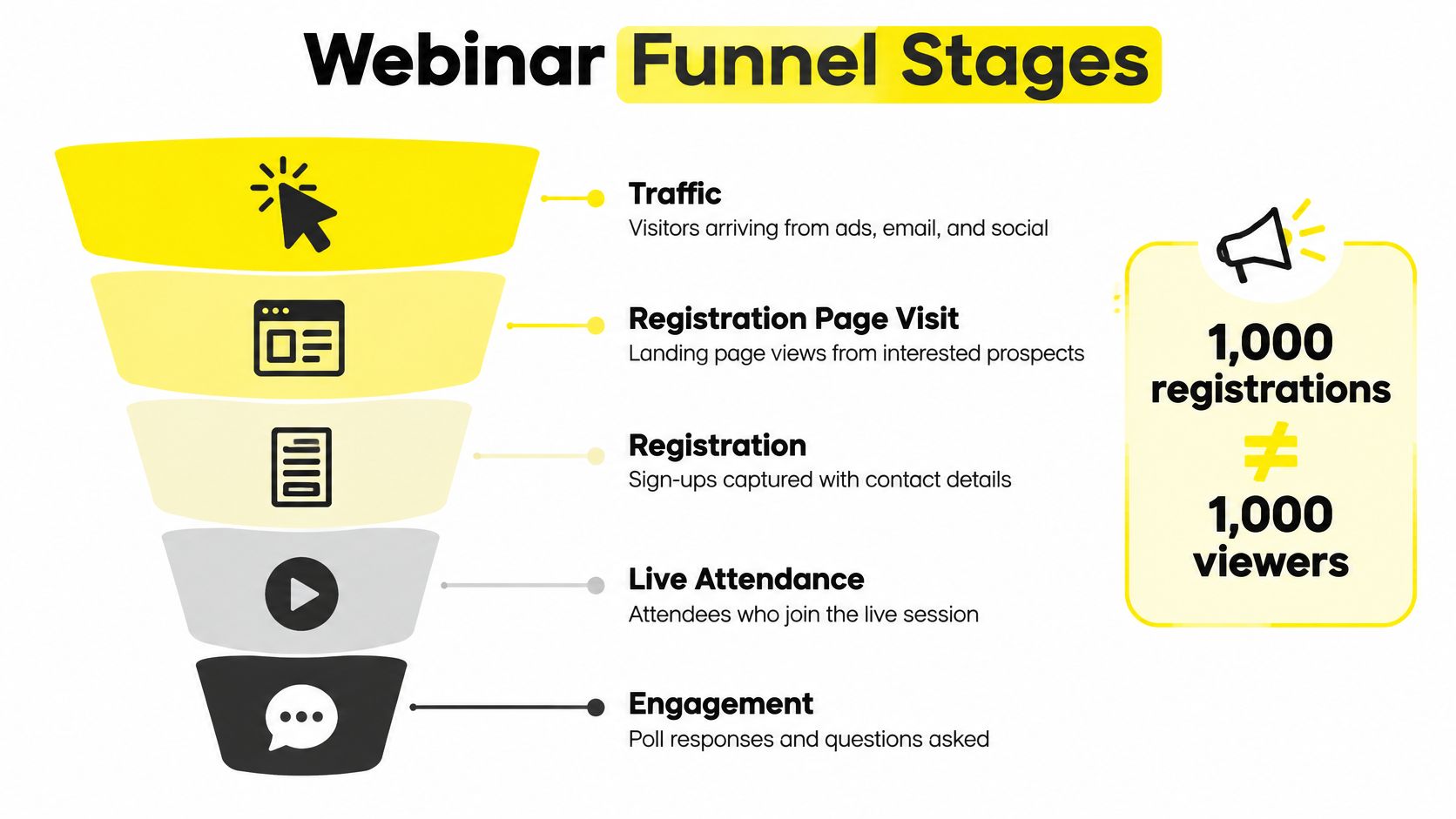
Attendance is only one measure of what happened in the room. In the same dataset, average watch time was 26 minutes in sessions lasting about 68 minutes. Active participation averaged 15.4%, with 20.4 questions per session, 2.77 polls per webinar, and 0.58 chat messages per attendee in 60- to 75-minute sessions.
A registrant who watches 26 minutes and answers no poll attended, but showed little measurable engagement. Keep attendance and engagement as separate outcomes: the first indicates reach, while polls, questions and watch time help identify who paid attention.
Eight stages, eight targets
Track each stage by traffic source and session. That lets you find the specific handoff where registrations, attention or sales fall away.
Traffic. Record paid, owned and organic sources sending people to the registration page.
Registration page visit. Track landing page views by campaign and creative.
Registration. Count captured names and store each person's source and consent status.
Live attendance. Use the webinar platform's attendance file to track who joined.
Engagement. Record watch time, polls answered, questions asked and resources downloaded.
Offer CTA. Track offer clicks and the session minute when each happened.
Booked call or purchase. Record these in the CRM, not just the ad account.
Post-webinar nurture. Track replay viewers, no-shows and attendees separately.
A single conversion rate hides where the funnel loses people. Separate stage targets make it possible to identify which handoff needs attention.
Why published benchmarks disagree
Benchmark figures depend on what each report counts. Some measure live attendees only; others include replay viewers. Some count unique registrants, while others include duplicate registrations. Compare like with like before deciding whether a result is strong or weak.
The same handoff logic applies to other funnel types. This guide to the ecommerce sales funnel explained describes how one stage passes people to the next. For webinars, apply that discipline to registration, attendance, engagement and the offer.
Stage | Metric | Reference value | What to do with it |
|---|---|---|---|
Registration page to registration | Registration conversion | No comparable reference value is reported in the cited dataset | Test headline and form length before adding traffic |
Registration to live attendance | Attendance rate | 47.7% live only in the 2025 Livestorm dataset | Set your own target and track it by traffic source |
Attendance to engagement | Active participation | 15.4%, plus 20.4 questions and 2.77 polls per session | Count polls, questions and chat as separate signals |
Live attendance to offer CTA | CTA click rate | Use your first session as the baseline | Record clicks by session minute to find when attendees respond |
Replay viewer to conversion | On-demand conversion | Track separately from live conversion | Keep the replay page focused on one clear offer |
Booked call or purchase | Show rate and close rate | Read from the CRM, not the webinar report | Reconcile CRM revenue with ad and webinar reports |
Set a target for every stage before paying for traffic. When sales close weeks after the webinar, keep the original source and campaign attached to each CRM record so delayed revenue can be compared with the ad-platform results.
How to Build the Offer and Registration Flow
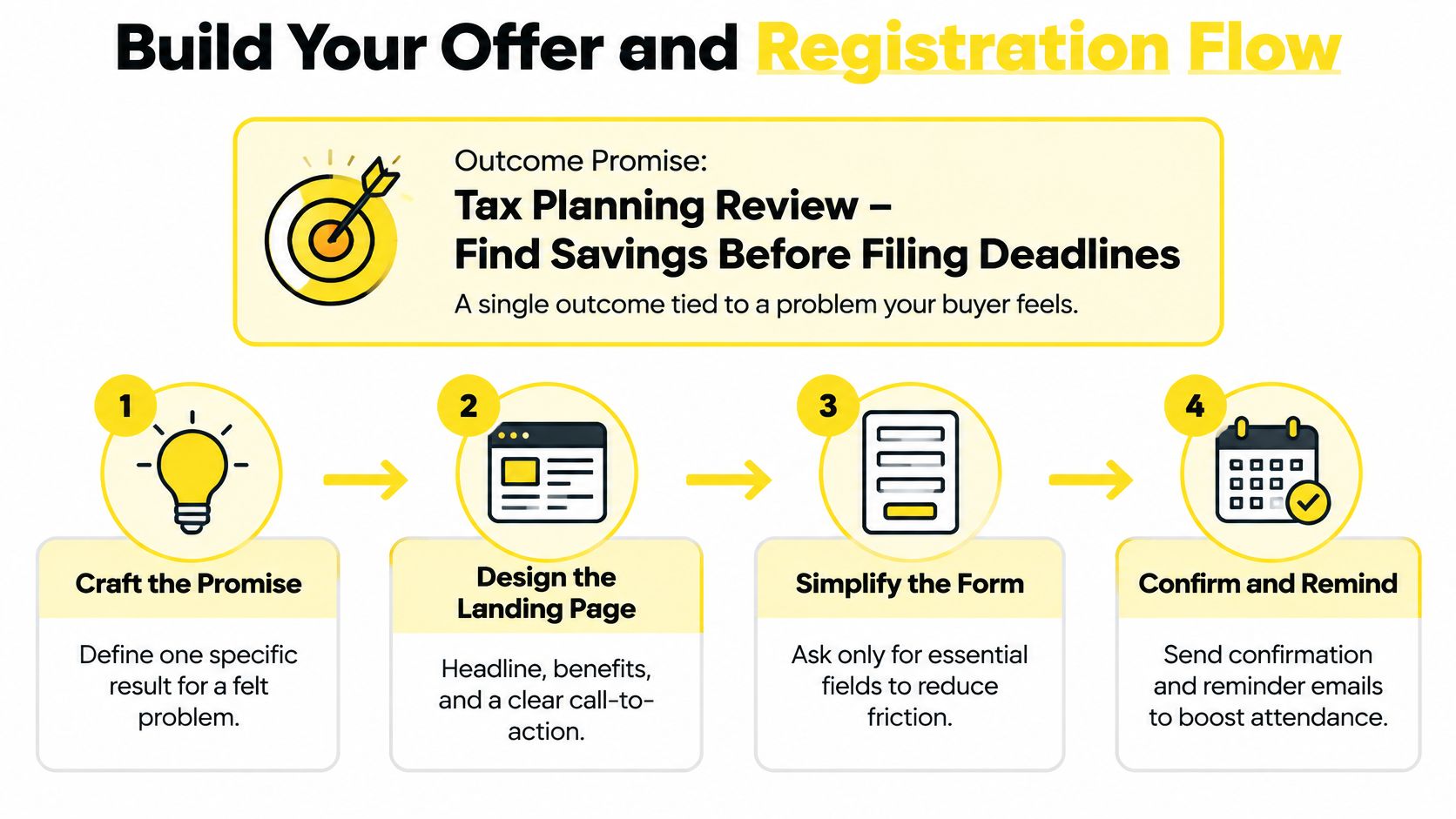
The offer comes first. Not the page, not the ads, not the slide deck. A webinar converts when it promises one outcome the buyer already wants and can already name, and every asset downstream repeats that promise without drifting.
For a tax advisor, that outcome might be a planning review that finds savings before the filing deadline. For a coach, it's a client result with a number and a timeframe attached. For a consultancy, it's an audit showing where money leaks. One sentence, one outcome, no list of topics.
The five moves, in order
Write the promise as one sentence. Your ad, headline and opening slide all repeat it, and that repetition is what makes a cold click feel familiar by the time the room opens. The usual mistake is naming a topic instead of an outcome. A "tax update webinar" attracts the curious; "the deductions your last return missed" attracts people with a reason to sit through the hour.
Name the call to action and the risk reducer. Decide now whether the next step is a 20-minute consultation, an application or a checkout, and attach the guarantee that makes booking feel safe. Skip this and the offer slide turns vague, which is the single most common reason a well-attended session produces no calls.
Build the page around one headline. It should repeat the promise, follow with three short proof points, show the date and time in the visitor's time zone, and ask for name and email only. Long forms cut registration volume without improving quality. Phone number, revenue band and "how did you hear about us" belong on the call, where you can qualify someone.
Turn the confirmation page into the first nurture step. Offer the add-to-calendar file, restate the date in local time, and promise the replay. That page is the cheapest attendance lever you own, and most businesses waste it on "check your email."
Send the confirmation email within minutes. Include the join link and exactly one next step. An email that arrives an hour later gets read after the prospect has moved on to something else.
Test the flow with five people
Send the link to five people who match your buyer and watch them register without help. Every clarifying question they ask out loud is a sentence missing from the page.
The five-person test: if two of five ask what the webinar will actually cover, your headline is a topic, not an outcome. Rewrite it before you spend a dollar on traffic.
A registration flow that works feels almost too plain from the inside: one promise, one button, one date in local time, one clear next step waiting in the inbox.
Paid Traffic Sources and Attendance Reminders
A service firm pays $300 and watches 300 people register. Two days later the room is a third full, and the first booked call does not close for three weeks. The ad account still calls the campaign a win. Split the webinar into stages, give each stage its own target, and those two reports stop arguing with each other.
Work in a fixed order. Raise registration conversion and lead quality first, lift attendance second, and only then increase spend. Extra traffic into a weak page, for an event many registrants skip, multiplies the waste.
A 2024 benchmark covering 19,531 webinars across 418 B2B brands reported 238 average registrants, 51 average attendees and a 33% registrant-to-attendee rate, plus 21 average on-demand views at a 9.5% on-demand conversion rate (Goldcast's B2B webinar benchmark report).
Put money against those rates. One event business client achieved a 10% click-through rate and $1 per lead, producing 300 leads for $300. That is 300 invitations. At the 33% attendee rate, roughly 99 join live. Click-through rate and cost per lead belong to the ad stage. Show rate belongs to the reminder stage. Closed revenue belongs to the CRM, often weeks after the session, so match each lead by email and registration date and read revenue only after that lag. I would rather fix the stage that is missing its target than buy more of a number the sales team cannot use yet.
What each channel is good at
Source | Best use | Metric to watch |
|---|---|---|
Facebook and Instagram | Broad registration volume and retargeting of visitors who didn't register | Cost per registrant and attendance rate |
TikTok and YouTube | Short video ads that send curious viewers to the registration page | Cost per registrant and the share who attend |
Google Search | Capturing people already searching for a solution | Cost per qualified registrant |
Email and SMS reminders | Lifting attendance among people already registered | Show rate against registrants |
Read the right-hand column for that source. A cheap registrant who never attends costs more than a pricier one who shows up and books, and neither figure is revenue until the CRM records a close.
The reminder sequence that lifts show rate
Calendar file on the confirmation page. It sits on the prospect's own calendar on the day, even if the inbox is ignored.
Reminder email the day before. One reason to attend, one join link, no new offer.
SMS an hour before. The highest-impact message in the sequence, because it reaches people who intended to come and forgot.
Retarget registered non-attendees with the replay. They already said yes once. Give them the second chance, and count on-demand views as their own stage, not as live attendance.
Retarget attendees with the offer. Repeating the webinar to people who watched it wastes the warmest audience you have. Point them at the call instead.
Hold spend until the show rate stays steady across two consecutive sessions. Until then, every extra registrant is a larger bill for the same half-empty room, and the delayed closes in the CRM will not bail out a stage you never fixed.
Structuring the Live Presentation Script to Earn the Offer
The script is the only part of the funnel you deliver live, so it has to be repeatable. A fixed running order lets you compare one session against another and against your benchmarks, instead of guessing why last month's event felt better.
Interaction isn't a modern add-on. A peer-reviewed review of the format's history traces the earliest prototype to PLATO, developed in 1960 by the University of Illinois and Control Data Corporation, and describes Microsoft NetMeeting in 1996 as the first public web conference, with chat, voting and polling built in (review of interactive online communication). The participatory features were there from the beginning. Use them.
A running order you can repeat
Open inside two minutes with the outcome from the registration page. Then run a poll so the room is responding by minute two. Slow intros are why people leave before the teaching starts.
Teach three points, each ending in one concrete step. Attach a proof story to each point: one client, one number, one timeframe.
Ask for one interaction every ten to fifteen minutes. A poll, a question prompt, a resource download. These are the signals that feed your lead score later, so design them rather than hoping chat fills itself.
Place the offer after your strongest teaching point. That usually lands near the middle. Restate it at the close with the guarantee and a real deadline.
Close with one next step and a replay promise. People who leave early still get a route back in.
Timing rule: if the first poll lands after minute five, a chunk of the room has already decided to leave. Move it earlier.
Keep the pitch short. Sessions run just over an hour, and a pitch that stretches past five minutes starts costing you the people who were close to booking. Record the minute each CTA appears so you can compare clicks by session minute across events.
Scoring Leads and Running the Follow-Up Sequence
The most expensive habit in webinar marketing is optimizing for registrations. A high registration count hides weak attendance, low-fit leads and unprofitable bookings, and it looks like success on the dashboard the entire time.

ON24's 2025 benchmark summary gives a useful sense check: 57% average registration-to-attendee conversion, 216 average attendees, 51 minutes of average engagement, 130 poll responses, 91 resource downloads, 19 survey responses and 14 attendee questions per webinar, alongside an 18% lift in demo bookings and a 21% lift in CTA engagement per attendee (ON24's 2025 webinar benchmarks summary). A session that produces fourteen questions and two downloads isn't engaged, whatever the attendance line says.
How the score works
Assign points for behavior, not for registration: staying past a defined watch-time threshold, clicking the offer CTA, downloading a resource, asking a question, requesting a consultation. Give minimal points to people who never attended or watched two minutes of the replay. If you want the groundwork first, this guide to how lead qualification works settles the definitions that make a score meaningful.
Score tier | Signals | Next action |
|---|---|---|
High | Stays past your watch-time threshold, clicks the offer CTA, asks a question or books a call | Same-day human outreach from sales |
Medium | Attends part of the session, downloads a resource or answers polls | Proof-and-objection email sequence over one week |
Low | Registers but never attends, or views the replay only briefly | Replay reminders and educational retargeting |
The routing matters more than the arithmetic. High-tier leads decay fast, so same-day outreach from a person, not a sequence, is the only thing that reliably converts them.
Here is the walkthrough of the scoring and follow-up logic in practice.
The three-email middle tier
The medium tier carries most of your bookings, and three emails over one week is enough to work it:
Email one, replay plus one proof story. Same client, same numbers as the webinar, one link.
Email two, the case that answers your top objection. Pull the objection straight from the chat transcript, then answer it with a specific example.
Email three, the offer with a deadline. One call to action, a date the offer closes.
Every marketing email needs a working unsubscribe link, and people can also opt out of marketing communications by contacting the business directly. Keep the opt-out visible and honor it across every platform you use.
Review the tiers monthly against booked calls. If the high tier produces no revenue, the threshold is too loose and too many people are reaching sales.
Tracking Delayed Sales When Attribution Breaks
Platform ROAS and closed revenue part ways the moment a sale lands weeks after the click. A registrant comes in from a Facebook ad, sits the webinar, books nothing, then takes a call three weeks later and signs after a follow-up email. The ad platform credits a slice of that path. Browser tracking drops the rest. The call is offline. The invoice sits in a system the ad manager never reads.
Spend decisions made on that partial view are expensive. You pause the campaign that produced the customer because another touch got the credit, or you scale the campaign that stacks clicks and never closes.
The fix is first-party events stored on the lead, not a better guess inside the ad account. Capture source and campaign (ad, creative, traffic source), consent status at registration (stored on the record and allowed to differ by market), behavior (attendance, share of the session watched, questions, downloads, CTA clicks), and outcome (booked call, opportunity stage, closed revenue).
One monthly reconciliation
Pull platform conversions beside CRM outcomes once a month and name every gap. Double counting puts one lead under two sources. Timing gaps appear when the platform books a conversion the CRM later refunds, or when cash arrives after the platform's window has already closed. Privacy limits, consent rules and first-party data now decide how much of that path a platform can even report, which is why the CRM has to be the referee.
Match the conversion window to the sales cycle: 30 days for a coaching offer, 45 for tax planning or real estate. Put revenue per attendee next to ROAS. Judge the funnel on closed business, not on the last click the pixel saw.
Keep cost per registrant, cost per attendee, cost per qualified appointment, show rate, close rate, customer-acquisition cost, revenue per attendee and return on ad spend in one view. A figure that exists only inside the ad platform will not hold up in a budget meeting.
Fixing Low Attendance, Weak Bookings and Mismatched Reports
The complaint arrives almost word for word every time: registrations are strong, nobody showed. Or the room was packed and nobody booked. Both are diagnosable, and neither is a webinar problem in the abstract. Each points at one stage.
Start by checking the stage, not the whole funnel. If the room is thin, the problem is upstream of the presentation. If the room is full and quiet, it's in the script.
Symptom | Likely cause | Fix |
|---|---|---|
Many registrations, few attendees | Weak reminders or an unclear start time | Confirm the start time in the visitor's time zone and tighten reminder timing |
Attendees leave within ten minutes | Slow opening with no clear promise | Open with the outcome and run a poll by minute two |
Strong attendance, no bookings | Buried CTA or a vague offer | Restate the offer and guarantee, then run one CTA with a deadline |
Good click-through rate, high cost per lead | Landing page doesn't match the ad promise | Match the page headline and promise to the ad copy |
Sales calls don't close | Unqualified leads reaching sales | Raise the score threshold before routing to sales |
Revenue doesn't match ad reports | Platform and CRM count differently | Store source and consent on each record, then reconcile |
Which fixes take one cycle and which take a month
Page and reminder fixes are fast. A headline change, a time zone correction, an SMS an hour before, all show up in the next session's numbers. Offer and qualification fixes need a month of data before you can trust the trend, because bookings trail attendance by weeks in tax, real estate and consulting.
Change one variable at a time. Two changes in the same cycle tell you nothing, and you'll spend the next quarter guessing which one earned the improvement.
The mismatched-report problem is the one that persists longest, because it isn't a marketing problem at all. It's a data problem, and it gets fixed by storing source and consent on every record and reconciling monthly against closed revenue instead of trusting whichever dashboard loads fastest.
Launch a Small Test Webinar Before Scaling Spend
A full registration list can still leave the calendar empty three weeks later. Run one small event before you commit real budget. Set a fixed spend that produces 100 to 200 registrations, then score the session on its own targets: attendance rate, engagement, booked calls, and closed revenue in the CRM. Registrations only tell you the top of the sequence. For coaches, real estate professionals and local service firms, sales often close weeks after the live date, so an ad-platform win can sit next to a thin CRM.
Before the launch, confirm four things:
The page repeats the ad's promise. Headline, subhead and offer vocabulary should match word for word.
The reminder steps are scheduled. Confirmation, day before, an hour before, and a replay follow-up.
The replay page carries one offer. One button, one deadline, no menu of options.
CRM fields capture every stage. Source, consent, attendance, watch percentage, CTA click, booked call, closed revenue.
Write the number you will accept beside each field before spend starts. A show-rate floor, an engagement floor, a booking rate, and a revenue figure you will read only from the CRM after the follow-up window. Platform dashboards stay the traffic view. The CRM is the revenue view, and you reconcile the two once delayed closes are in, not on the morning after the webinar.
If short video is filling the room, the campaign setting decides whether those clicks land on a registration page or a profile. Use this guide to pick the right TikTok campaign objective before that test spend goes live.
After the session, compare each stage with its target and change only the stage that missed. Rerun the same budget. Raise spend once attendance, bookings and CRM revenue all clear their targets together. Scaling on registrations alone buys cheap signups that never become calls.
This week, write a target for each stage, set the test budget, and book the first session date.
Wojo Media builds the paid side of this funnel for coaches, real estate professionals and local service businesses. The work covers the offer and guarantee, the landing page that has to match the ad, and campaigns across Facebook, Instagram, TikTok, Google and YouTube, with retargeting and backend KPI tracking behind them. The first step is a free demo call with Jason or a growth manager. On that call you cover what is working, what could be improved, and best practices for scaling. Book it through the calendar.
Comments