.png)
Google Ads Negative Keywords: How to Stop Wasting Ad Spend

Google Ads negative keywords prevent ads from triggering on irrelevant searches, with account-level exclusions capped at 1,000 keywords and Display or Video campaigns considering up to 5,000 negative keywords for a single ad. The profitable approach isn't to block everything unfamiliar, but to use real query data to remove waste while protecting searches that can convert.
You can have strong ad copy, a credible offer, and a landing page that converts qualified visitors, yet still watch performance deteriorate because your campaigns attract the wrong people. A home services advertiser may target plumbing searches and pay for clicks from people looking for free tips, repair instructions, or jobs. Those visitors aren't necessarily bad people or bad searchers. They're just outside the buying journey the campaign was built to serve.
That wasted traffic is an invisible tax. It pulls budget away from commercial searches, muddies performance data, and makes scaling look less attractive than it should. Negative keyword management is the control layer that keeps your targeting connected to business intent.
Why Negative Keywords Are Your Secret Weapon for Profitable Growth
A campaign can generate plenty of clicks and still fail commercially. The problem often isn't volume. It's that the campaign is paying to reach people whose searches reveal no realistic path to the offer.
A home services campaign, for example, might show for searches such as “free plumbing tips” or “how to fix a leak yourself.” Those queries contain the service category, but not the buying intent. If the advertiser leaves them untouched, Google continues learning from a mixed pool of homeowners, DIY researchers, job seekers, and potential customers. The reporting becomes harder to interpret, and every optimization decision starts from a less reliable signal.

Exclusion is a growth decision
Many advertisers treat negative keywords as account housekeeping. They add a few terms after a poor week, then move on to bids, creative, or landing page changes. That approach misses the commercial value of exclusion. A carefully chosen negative keyword can prevent an entire class of irrelevant searches from consuming budget and distorting campaign learning.
This matters most when an account is scaling. More reach creates more opportunities to find buyers, but it also exposes the campaign to more ambiguous queries. Scaling without query control doesn't create predictable growth. It creates a larger testing bill.
A useful paid media framework should connect audience, message, offer, placement, and measurement rather than treating targeting as an isolated setting. For a broader view of the components that support effective campaigns, 9 elements of B2B advertising provides helpful context. Negative keywords fit into that system by protecting the relationship between the promise in the ad and the intent behind the click.
What disciplined advertisers protect
The strongest exclusion strategies don't aim for the smallest possible traffic pool. They aim for a cleaner pool with enough room for discovery. That distinction matters because some broad searches may introduce future customers, while others are clearly unrelated from the first impression.
Practical rule: Exclude a query when its meaning conflicts with the offer, not merely because it hasn't converted yet.
A profitable account usually separates obvious irrelevance from uncertain intent. “Free,” “jobs,” or “how to” may be appropriate exclusions for one offer and valuable audience signals for another. A coaching business, a local contractor, and an e-commerce store can see the same word and reach different conclusions.
The work is therefore strategic. Review the query, understand the searcher's likely next action, and decide whether that action belongs in the campaign. That habit turns negative keywords from a cleanup task into a margin protection system.
What Are Negative Keywords and How Do They Work
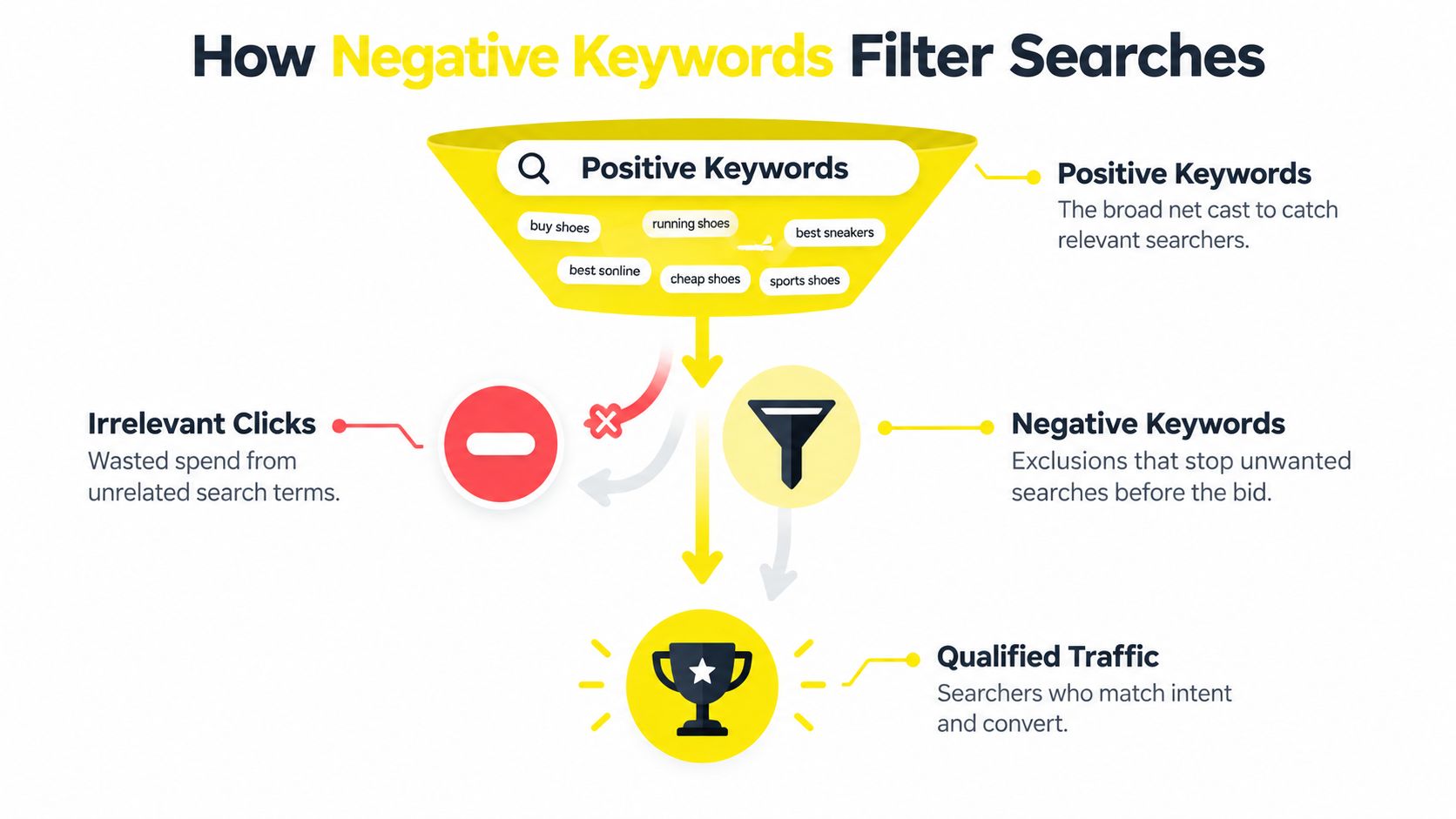
Positive keywords define the searches you want to reach. Negative keywords define searches you don't want to enter the auction for. When a user's query contains a blocked term or phrase, Google Ads can prevent the ad from being triggered.
Google documents negative keywords as an exclusion mechanism that can operate at the ad group, campaign, account, and Shopping levels. Account-level negative keywords automatically apply across Search and Shopping inventory. Google also documents a 1,000-keyword account-level limit, a separate 1,000-keyword consideration for Display and Video campaigns, and up to 5,000 negative keywords considered for a single Display or Video ad in Ads Editor. These controls make account architecture part of keyword strategy, not an administrative afterthought. Google's documentation on negative keywords and account-level controls explains the available levels and limits.
Choose the right level
Use the ad group level when the exclusion protects one product, service, or theme. If one ad group sells emergency plumbing while another promotes plumbing training, a term related to education may belong only in the emergency service group.
Use the campaign level when the rule should apply to every ad group in that campaign. A campaign built exclusively for residential services might exclude commercial terms throughout the structure.
Use the account level for exclusions that should apply broadly across Search and Shopping. This can simplify governance, but it also raises the cost of a mistake. A term that seems irrelevant in one campaign may be commercially valuable in another.
Think in filters, not deletion
A positive keyword is like a net cast across a category of searches. A negative keyword is a filter fitted to that net. The filter should remove debris without stopping the fish you want.
That means every exclusion needs context. A retailer selling complete products might block “replacement parts,” while a parts supplier may want that traffic. A local service provider might exclude “DIY,” while a company selling instructional material may target it deliberately.
The operational question is simple: Would a person using this query plausibly buy the offer advertised in this campaign? If the answer is clearly no, the term is a strong negative candidate. If the answer is uncertain, keep it under review rather than applying a broad block immediately.
The Three Negative Keyword Match Types Explained
Match types control how much search variation a negative keyword can block. Choosing the wrong type creates one of two problems: the campaign keeps paying for irrelevant variants, or it suppresses qualified searches that share a word with the unwanted query.
Google notes that negative keyword lists can be shared across campaigns using broad, phrase, or exact match options. It also warns, in practical terms, that match behavior and inventory-specific limits matter at scale. In Display and Video campaigns, Google states that a maximum of 5,000 negative keywords is considered for any given ad. Google's guide to negative keyword match behavior and shared lists is the reference point for managing these constraints.
Exact match for narrow protection
An exact negative blocks the specific query represented by the negative keyword. Use it when one search is clearly unqualified but nearby variations could still be relevant.
For example, an estate agent may want to block a particular query that signals a property type outside its service, while preserving longer searches that contain related language. Exact match is useful when the advertiser has identified a precise problem and doesn't want to make assumptions about the wider theme.
This is the safest option for ambiguous words, but it can require more maintenance because each unwanted variation may need separate attention.
Phrase match for controlled patterns
Phrase match blocks searches containing the negative phrase in the specified order. A phrase such as “cheap hotels” can filter searches that include that sequence while avoiding queries where the same words appear in a different order.
Phrase match often works well for recurring intent patterns. Terms related to free resources, employment, tutorials, or a product category you don't sell can be grouped into focused lists. The phrase should be long enough to express the unwanted intent and short enough to catch meaningful variations.
Broad match for strong exclusions
Broad negative matching is the most aggressive choice because the query can be blocked when it contains the words in the negative keyword. That can be useful for a term that is unambiguously outside the offer. It can also cause damage when the word appears in qualified searches.
A contractor who adds “contractor” as a broad negative could block searches for tools, licenses, or other services that might be commercially relevant. A retailer that blocks a brand name without checking its catalog could suppress searches for products it stocks.
Protect discovery: Use broad negatives only when every reasonable interpretation of the term is irrelevant to that campaign.
Layer lists by confidence. Keep universally irrelevant terms separate from uncertain or experimental exclusions. That structure makes it easier to remove a problematic rule, compare campaign behavior, and preserve qualified discovery as the account grows.
How to Discover and Maintain Negative Keywords
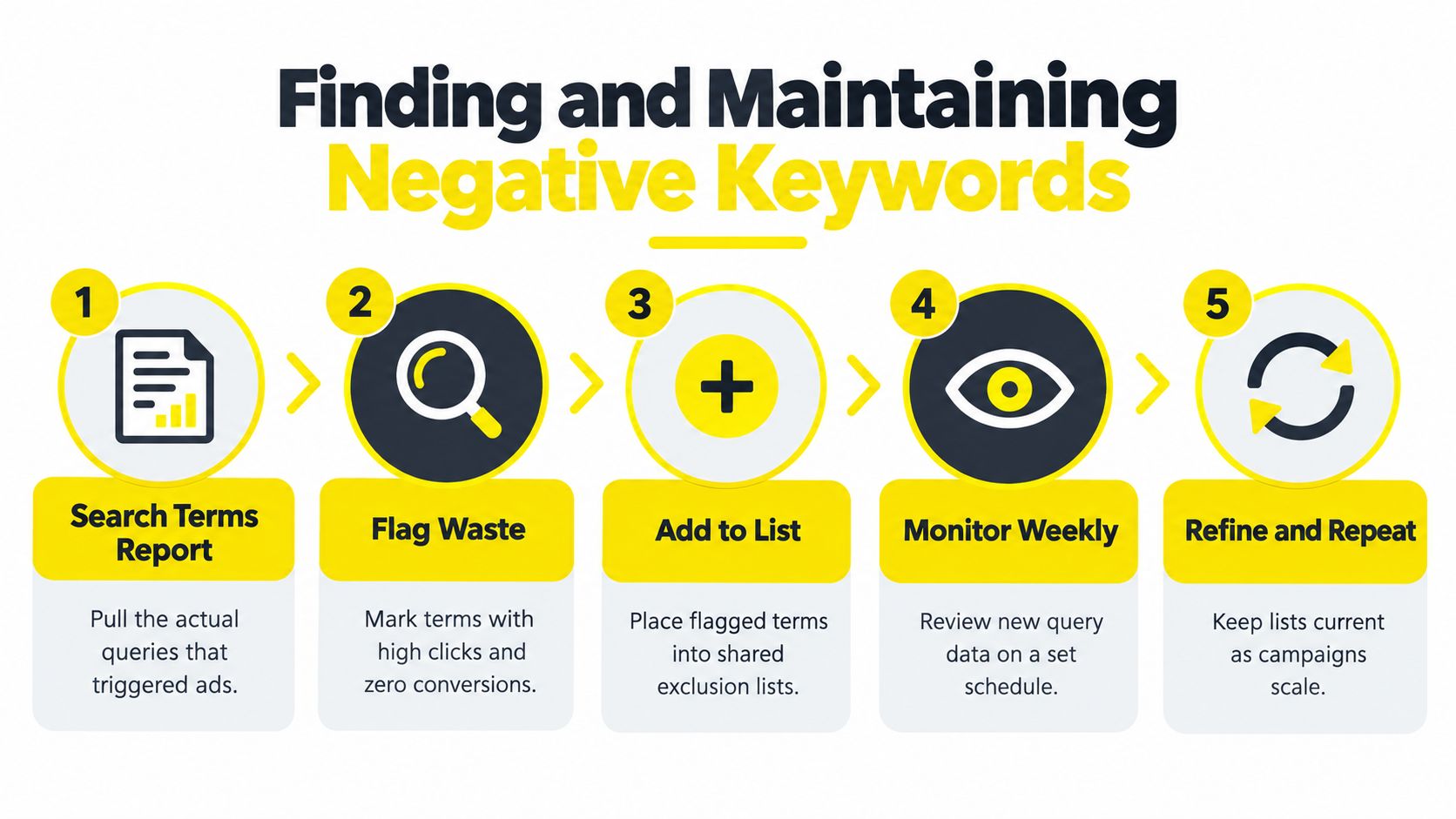
Guessing negative keywords before launch has value, but the search terms report is the definitive source of truth. Google says the report surfaces actual queries that triggered impressions and clicks, and recommends using it to identify searches that aren't relevant enough to the products or services offered. Google's guidance on search terms and negative keywords connects exclusion directly to observed query data.
Start with the report, then classify each candidate rather than adding everything that looks unfamiliar.
A practical review sequence
Pull actual queries. Review the searches that generated impressions and clicks, not just the keywords you entered into the campaign.
Flag clear waste. Look for employment, free information, unrelated products, DIY instructions, and searches that contradict the offer.
Separate uncertainty. A low-converting query isn't automatically irrelevant. Check its wording, landing page, conversion path, and commercial meaning before blocking it.
Apply the narrowest useful match. Start with exact or phrase match when the term has multiple meanings. Reserve broad match for exclusions with little interpretive risk.
Recheck the result. After adding a list, monitor new query data for signs that qualified variants have disappeared.
Google's documentation makes the report the central feedback loop. That is more reliable than building a giant exclusion list from assumptions, especially in accounts where product ranges, locations, or offers change.
The same principle across four verticals
An e-commerce brand selling finished furniture may investigate searches containing “DIY,” “plans,” “used,” or a product category it doesn't stock. It should keep terms such as “replacement parts” separate if the catalog may expand into components.
A local service business can review searches involving “jobs,” “free,” or “how to.” A plumbing company may exclude repair instructions, while a training provider may preserve them. Geographic words need care because a location that seems outside the service area may still describe a valid customer.
A coaching business might separate “template,” “PDF,” and “free course” from broader problem-aware searches. Someone looking for a framework may still be a viable prospect, even if the query doesn't mention coaching.
A real estate advertiser should distinguish owner-occupier, investor, rental, and commercial intent before building exclusions. Terms such as “cash,” “flipper,” or “investor” could be wasteful for one campaign and central to another.
Maintenance is a governance problem
Use a regular review rhythm that matches campaign activity. New campaigns generally need closer attention because query patterns haven't stabilized. Mature campaigns still need scheduled reviews because offers, inventory, competitors, and landing pages change.
At scale, limits make list hygiene important. Google documents a 1,000-account-level cap and distinct Display and Video considerations, so duplicate, vague, or redundant exclusions consume governance capacity without improving control. Keep shared lists named by purpose, audit overlap, and document why an ambiguous term was added.
Negative Keyword Strategies Across Industries
The right list depends on what the advertiser sells, how buyers search, and where the campaign sits in the funnel. A universal list containing “free,” “cheap,” “jobs,” and “DIY” may look efficient, but it can remove legitimate demand when applied without context.
E-commerce needs catalog alignment
Retail campaigns should begin with the product range. Exclude brands, materials, sizes, or product types the store doesn't carry, but don't turn those exclusions into permanent account-wide rules if the catalog changes frequently.
A store selling complete appliances may separate “parts,” “manual,” and “repair” searches from transactional queries. A store selling components should do the opposite. Product exclusions belong in lists that the merchandising team can review alongside catalog updates.
Local services need intent and location control
A med spa, barber, or home services company often pays for informational and employment searches. Terms connected to “salary,” “training,” “course,” “jobs,” or “how to” may be relevant exclusions, but only after checking the actual offer.
Competitor names also deserve their own list. If the business isn't running a conquesting test, those terms may not fit the campaign. Keeping them separate preserves the option to test competitor intent later without rebuilding the entire account structure.
Coaches need to separate learning from buying
Coaching and consulting searches often mix education, implementation, and purchase intent. “Template” may signal a free-resource seeker, but it may also indicate a prospect who needs help applying a process. “Course” could be irrelevant for a high-touch service or highly relevant for a course creator.
Use the landing page and conversion event as the deciding context. Don't block an entire problem category because some searches are informational. Remove terms that clearly contradict the paid offer, then let the report reveal which borderline themes deserve testing.
Real estate requires audience precision
Real estate campaigns can fragment quickly across buyers, sellers, investors, landlords, and commercial audiences. A campaign for owner-occupier listings may need to separate investor language, while an investor campaign may depend on it.
Create distinct lists for clearly incompatible audiences rather than combining every non-core term into one master exclusion. That approach keeps campaign routing cleaner and prevents an account-level rule from removing demand that belongs to another business unit.
A negative keyword should route intent, not erase it. If the search is valuable but belongs in another campaign, use structure to send it to the right place.
Implementing Negative Keywords in Google Ads
Set the exclusion at the narrowest level that solves the problem. Use an ad group negative when one product theme needs protection, a campaign negative when every ad group shares the rule, and a shared list when several campaigns face the same irrelevant intent.

Build the account architecture
Open the relevant campaign or ad group in Google Ads, enter the keyword area, and choose the negative keyword option. Add terms individually or upload a prepared list. Check the match type before saving, because a broad exclusion can remove more valid demand than intended.
Create shared exclusion lists in the shared library and apply each one only to the campaigns that need it. Separate lists by purpose, such as irrelevant intent, employment, competitor research, products you do not sell, and campaign routing. One oversized list becomes difficult to audit and risky to edit.
Use this decision model:
Ad group level: The exclusion protects one product or service theme.
Campaign level: The exclusion applies to every ad group in the campaign.
Shared list: Several campaigns need the same rule.
Account level: The term is irrelevant across the applicable Search and Shopping inventory.
Account-level controls require the strictest review. Before adding a broad term, search the account for legitimate uses in keywords, queries, product names, or campaign themes. Because account-level lists cap at 1,000 entries, plan shared lists by purpose, such as employment, free resources, competitors, and routing, before approaching the ceiling. Prune duplicates during each monthly review.
Connect exclusions to profitability
Negative keywords do not repair a weak offer or a poor landing page. They make incoming traffic more relevant, giving the offer, landing pages, omnipresent ads, and data a cleaner environment in which to perform.
Wojo Media treats negative keywords as part of the data and ad-management layer, the layer that helped push lead costs below $10 and produce multi-ROAS e-commerce wins in accounts bolted onto existing brands. That result reflects the counterintuitive scaling lesson: aggressive exclusions can support profitable growth when they come from query data, rather than from assumptions made before the campaign has learned.
Advertisers reviewing a broader direct-to-consumer stack can compare advertising categories for DTC brands when deciding which systems need to connect around paid acquisition.
The operating question is how far to filter without removing useful discovery. Google's documentation on negative keyword updates and campaign coverage reinforces the need for deliberate list design and regular maintenance as coverage expands.
Use the search terms report as the review cycle. Classify wasted queries, apply the narrowest exclusion that resolves each issue, and isolate uncertain rules in a separate list. Check qualified traffic and conversion quality after changes. If performance improves, keep the rule. If valuable queries disappear, narrow or remove it.
If campaigns attract the wrong searchers, export query data before raising bids or rewriting every ad. Classify the waste, add carefully matched negatives, and confirm that qualified demand continues to enter the account.
If you want a paid media team to audit wasted query intent, improve campaign structure, and connect Google Ads exclusions with your offer, landing pages, creative, and tracking, visit Wojo Media. Bring the current search terms report so the review focuses on practical opportunities rather than assumptions.
Comments